How to Combine AI Testing with Human Oversight
Combine AI speed with human oversight—use HITL, on-the-loop, and in-command models to reduce errors and build reliable, secure QA testing workflows.

How to Combine AI Testing with Human Oversight
AI testing is transforming quality assurance by automating repetitive tasks, cutting test creation time from hours to minutes, and boosting efficiency for 81% of development teams. However, AI alone isn't enough - it can produce errors or "hallucinations" that require human judgment to catch. The solution? Combine AI's speed with human oversight to ensure reliable, ethical, and accurate outcomes.
Here’s how teams can integrate human oversight into AI testing:
- Human-in-the-Loop: Review AI-generated test cases during planning to address edge cases and ensure alignment with business rules.
- Human-on-the-Loop: Monitor tests in real-time, stepping in when AI confidence drops below a set threshold (e.g., 80%).
- Human-in-Command: Analyze test results post-execution, identify failures, and provide feedback to improve AI accuracy.
Tools like Rock Smith streamline this process with features like live monitoring, semantic targeting, and test personas. By combining automation with human expertise, teams can reduce risks, improve accuracy, and create smarter workflows tailored to their needs.
Applied Artificial Intelligence - Human Oversight in AI Systems
sbb-itb-eb865bc
Three Levels of Human Oversight in AI Testing
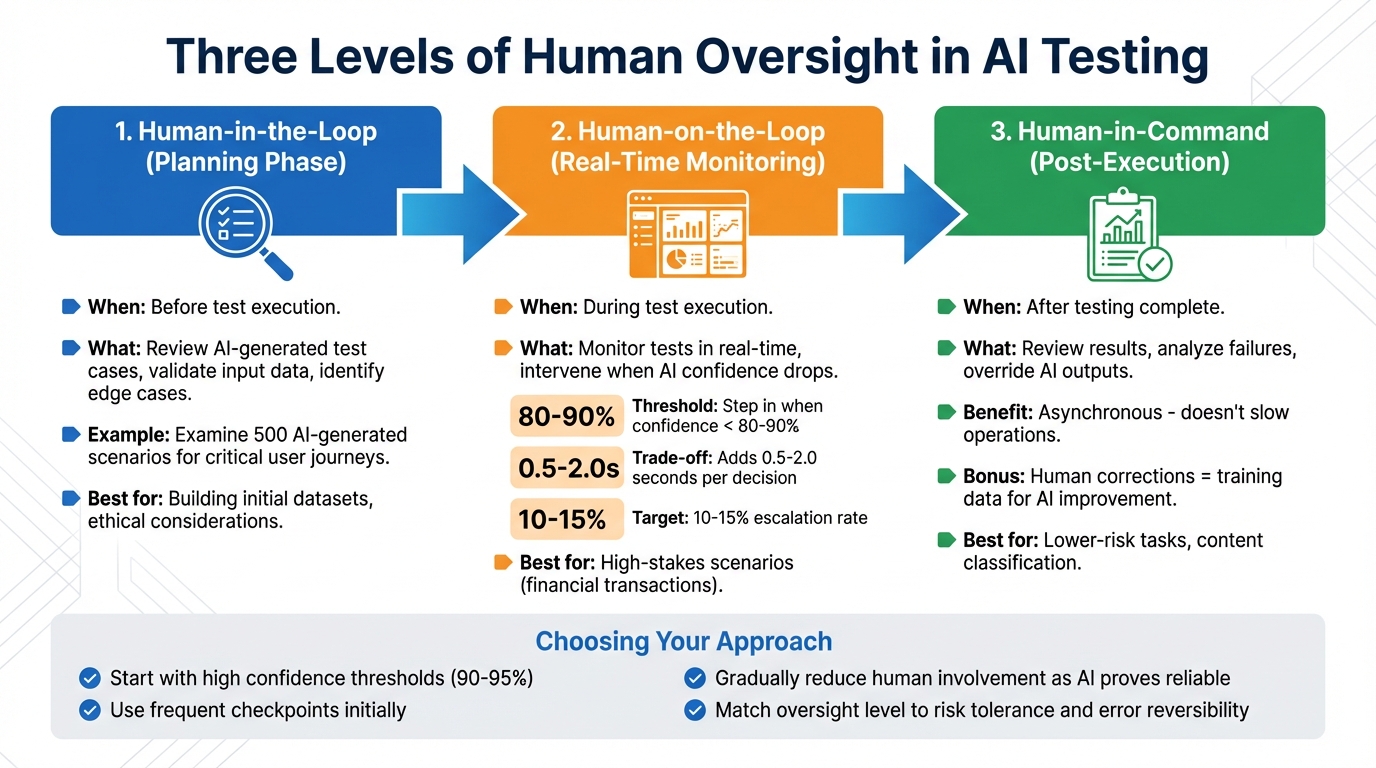
Three Levels of Human Oversight in AI Testing: When and How to Intervene
When it comes to AI testing, oversight isn't a one-size-fits-all process. It varies based on the level of risk and the stage of testing, with three distinct approaches offering flexibility. Choosing the right model ensures a balance between the efficiency of automation and the necessity of human judgment.
Human-in-the-Loop happens during the planning phase, before any tests are executed. At this stage, teams focus on reviewing AI-generated test cases, validating the quality of input data, and identifying edge cases that align with intricate business rules or ethical guidelines. For example, a team might examine 500 AI-generated scenarios to confirm they cover critical user journeys while removing any redundancies. This step is especially important when building initial datasets or working with systems where ethical considerations play a significant role.
Human-on-the-Loop involves real-time monitoring of tests, with humans stepping in when the AI's confidence level drops below 80–90%. This type of oversight is particularly critical in high-stakes scenarios, such as financial transactions. However, it’s worth noting that human intervention can add 0.5 to 2.0 seconds per decision. To keep operations sustainable, it’s recommended to aim for a 10–15% escalation rate, ensuring reviewers aren’t overwhelmed.
Human-in-Command comes into play after testing is complete. In this phase, humans review the results, analyze the reasons behind failures, and override AI outputs when necessary. This approach is asynchronous, meaning it doesn’t slow down operations, but it ensures long-term accuracy. It’s particularly effective for lower-risk tasks, like content classification or internal processes where mistakes can be easily corrected. Each human correction also doubles as training data, further improving the AI's accuracy over time.
Choosing the right level of oversight depends on how much risk you're willing to accept and how easily errors can be reversed. A cautious approach might start with high confidence thresholds (90–95%) and frequent checkpoints, gradually reducing human involvement as the AI proves its reliability. These models provide a structured way to implement oversight, forming a solid foundation for tools like Rock Smith to establish effective workflows.
Setting Up Rock Smith for Human Oversight
Configuring Key Features
Rock Smith includes features designed to make AI QA testing more transparent and easier to oversee. One standout is live monitoring, which provides step-by-step screenshots and AI-generated explanations in real time. This lets you validate decisions as they happen.
Another key feature is semantic targeting, which allows you to define test elements in plain language. For example, you can specify "blue sign-in button" or "checkout form at top right" instead of relying on fragile CSS selectors. This makes tests more adaptable and easier for non-technical team members to understand and review.
Test personas are also available to simulate different types of user behavior. These personas can mimic power users, mobile testers, or first-time users, helping uncover issues specific to each group.
For local browser execution, the Rock Smith desktop app lets you test on internal or staging environments while keeping sensitive data secure. Only testing instructions are sent to the cloud, ensuring privacy. Additionally, Rock Smith automatically generates 14 edge case tests - covering scenarios like boundary values, SQL injection, and XSS attacks - giving you a thorough security checklist to work with.
Once you've set up these features, you can move on to choosing a pricing plan that fits your testing needs.
Selecting Your Pricing Plan
Rock Smith offers three pricing options based on testing volume:
- Pay-As-You-Go: Costs $0.10 per credit, with a minimum purchase of 50 credits (totaling $5). This is perfect for small teams or trial runs.
- Growth Plan: Includes 550 monthly credits, with overage costing $0.09 per credit.
- Professional Plan: Designed for larger teams, this plan provides 2,000 monthly credits, with overage priced at $0.06 per credit.
Pick the plan that matches your anticipated testing volume and team size.
How to Implement a Human Oversight Workflow
After setting up Rock Smith and selecting your pricing plan, you can establish a three-step workflow that blends AI automation with human judgment. This approach ensures reliable testing outcomes.
Step 1: Generate AI Test Flows
Start by describing your tests in plain English, and Rock Smith's AI will transform them into executable flows - no coding or fragile selectors required. For example, you could write, "Click the blue sign-in button at the top right, then enter valid credentials and verify the dashboard loads."
Rock Smith's automated discovery visually identifies app elements, allowing tests to adjust seamlessly when your UI changes. You can also set up test personas, such as "Power User" or "New User", to mimic different user behaviors and identify issues unique to each group. It's best to start with a single feature or a stable API before tackling more complex workflows.
Step 2: Monitor Tests in Real-Time
Once your flows are generated, the next step is ensuring they run smoothly. Use Rock Smith's dashboard to monitor live test execution. The dashboard provides step-by-step screenshots and AI reasoning, helping you catch logic errors early before they lead to unreliable tests.
You can set up confidence-based routing to pause execution if the AI's confidence drops below a certain threshold. For instance, if the AI is only 60% confident it found the correct button, the workflow can escalate the issue to a human reviewer. Additionally, you can configure anomaly alerts for validator failures, such as missing citations, malformed tool outputs, or schema issues.
"Triage should feel like a newsroom: fix, accept baseline, or ignore. Two clicks, not ten." - Lev Kerzhner, AutonomyAI
It's important to define clear escalation paths. Route ambiguous cases directly to a designated Slack channel for swift resolution.
Step 3: Review and Refine Test Results
After monitoring, dive into a detailed review of execution data. Analyze execution history and quality metrics to identify patterns, and examine AI reasoning logs to uncover recurring issues.
Use structured decision codes to classify failures. For example:
- INCORRECT: A factual or logical error - adjust the prompt constraints or retrieval logic.
- INCOMPLETE: Missing steps or constraints - update the prompt structure or add a checklist.
- UNSAFE: A policy violation or risky guidance - implement guardrails or escalation routes.
- FORMAT_FAIL: Invalid schema or tool output - fix validators or tool specifications.
When reviewing visual differences, you have three options: fix the application, accept the new visual baseline, or ignore non-critical changes.
Every correction you make feeds back into the system, improving the AI's accuracy over time and reducing the need for manual reviews. High-performing teams aim to resolve critical issues in under 10 minutes.
| Decision Code | Meaning | Typical Fix |
|---|---|---|
| INCORRECT | Factual or logical error | Adjust prompt constraints or retrieval logic |
| INCOMPLETE | Missing steps or constraints | Update prompt structure or add checklist |
| UNSAFE | Policy violation or risky guidance | Implement guardrails or escalation routes |
| FORMAT_FAIL | Invalid schema or tool output | Fix validators or tool specifications |
Training Teams and Creating Oversight Processes
Shift your QA teams' focus from just identifying bugs to ensuring AI outputs meet standards of fairness, explainability, and reliability. Instead of relying on exact string matches, train teams to use multi-dimensional rubrics - like rating accuracy, relevance, and tone on a 1–5 scale - to account for the variability inherent in AI systems. This approach builds on earlier oversight workflows, creating a consistent and reliable review process.
To strengthen these workflows, instill a mindset that actively challenges AI outputs. Automation bias - where reviewers uncritically approve AI-generated results - can be a real problem. Counter this by emphasizing that AI systems often struggle with edge cases and complex business logic. Train teams to critically assess outputs and introduce blind review samples to encourage independent judgment.
Clear escalation protocols are essential for effective oversight. Establish distinct authority levels: Triage Reviewers for quick classifications, Quality Reviewers for making edits, and Specialists for handling high-risk scenarios, such as financial transactions. Use predefined decision codes to structure feedback and maintain consistency.
"If a reviewer needs to 'invent policy' to decide, that is a specialist escalation. Reviewers should apply rules, not create them on the fly." - Norbert Sowinski, Creator, All Days Tech
Develop a core prompt library - a curated collection of versioned prompts covering key scenarios, ambiguous cases, and adversarial examples. This library becomes a training tool for new reviewers and a benchmark for testing regressions. Regular calibration sessions can help standardize rubric interpretations and reduce inconsistencies in decision-making. Additionally, run red teaming exercises to expose vulnerabilities by pushing the AI to reveal internal prompts or produce unsafe outputs.
A 2023 Gartner survey revealed that 68% of AI failures were tied to insufficient human review, highlighting the importance of proper training. By aligning team training with well-defined oversight processes, you can strike the right balance between the speed of automation and the critical judgment of human reviewers - an essential component of effective AI governance.
Measuring Success and Improving Over Time
To ensure your human oversight workflow runs smoothly, success should be measured using specific metrics. Focus on three key areas: quality (accuracy and false positive rate), efficiency (time-to-decision and reviewer workload), and process health (escalation and override rates). For high-risk fields like financial transactions or medical diagnoses, aim for a human intervention accuracy of at least 92%. Keep your escalation rate - the percentage of AI decisions flagged for human review - between 10-15% for operational stability. If this rate spikes to 60% or higher, it likely indicates system miscalibration that needs immediate adjustment.
Start with a two-week pilot to establish baseline metrics, such as time-to-decision, reviewer workload, and valid human override rates, before setting permanent thresholds. For instance, if time-to-decision exceeds 10 minutes for content reviews or 24 hours for financial decisions, consider adjusting staffing levels or streamlining approval processes.
Use insights from the pilot phase to fine-tune automation thresholds and escalation protocols. A phased rollout strategy is effective here. Begin with shadow testing, where your AI model runs without affecting real outcomes, then move to canary deployments, where 10-20% of traffic is handled by the new system. Implement automatic rollbacks if success metrics decline. Once the system proves effective in low-risk scenarios, scale up by creating reusable frameworks and guidelines for broader organizational adoption.
To balance automation with human review, incorporate confidence-based routing. For example, set escalation triggers for confidence levels below 80-90%, ensuring decisions in this range are routed to human reviewers. Calibrate AI confidence scores - using techniques like temperature scaling - to prevent overconfident yet incorrect decisions. Automate data collection by enhancing your logging system to capture timestamps, reviewer IDs, and decision outcomes. This will simplify metric tracking through SQL queries or centralized event stores.
Regularly evaluate and refine your process. Hold monthly retrospectives and recalibrate metrics quarterly to address recurring issues and adjust policies as needed. Human feedback should directly inform model retraining, prompt adjustments, or updates to retrieval filters to minimize future escalations. According to a 2023 Gartner survey, 68% of AI failures were tied to insufficient human review. Companies that prioritized time-to-decision metrics saw overtime costs drop by up to 30% due to better resource management.
Conclusion
Blending human expertise with AI capabilities is key to creating reliable QA workflows. While AI offers speed and efficiency, it often lacks the nuanced understanding needed to interpret failures. Human judgment bridges this gap, catching mistakes, verifying edge cases, and ensuring tests align with business goals and ethical considerations.
"AI can tell you something broke, but not why it broke. Or if it was even supposed to behave that way... That's exactly where human intelligence comes in".
Teams that combine human and AI efforts consistently outperform AI-only setups. Yet, 87% of AI projects fail to move into production, often because they lack the human oversight needed to navigate complex, unpredictable scenarios.
Rock Smith provides a solution by combining real-time monitoring, step-by-step screenshots, and AI-driven reasoning to streamline human validation. Its visual intelligence mimics how real users interact with applications, while semantic targeting enables tests to adapt automatically to UI changes. Additionally, local browser execution ensures sensitive data stays secure, even when testing internal or staging environments.
To get started, use confidence-based routing to handle straightforward cases while flagging low-confidence results for human review. Rock Smith’s AI reasoning insights can help you understand decision-making processes and refine your testing prompts. By tracking key metrics - such as accuracy, escalation rates, and decision times - you can measure success and make continuous improvements to your QA workflows. Incorporating these strategies with Rock Smith can help you elevate your testing approach over time.
FAQs
How does human oversight enhance the accuracy of AI testing?
Human oversight is essential in refining the accuracy of AI testing, particularly in areas where automated systems may fall short. While AI is excellent at processing vast amounts of data and spotting obvious errors, it often struggles with more nuanced situations, ethical dilemmas, or edge cases that require a deeper understanding and human judgment.
By using a human-in-the-loop (HITL) approach, critical decision points are reviewed and validated by people. This reduces the chances of errors, biases, or unintended outcomes. The combination of AI's speed and scalability with human expertise creates a system that delivers more reliable and context-aware testing outcomes. This collaboration ensures accountability and helps align AI systems with both organizational goals and broader societal expectations.
What are the main features of Rock Smith for AI-powered testing?
Rock Smith brings a suite of advanced tools tailored for AI-driven testing. Among its standout features is visual understanding, enabling the AI to interpret and navigate application interfaces effortlessly. Coupled with semantic targeting, it ensures pinpoint accuracy in identifying elements during tests.
The platform also excels in automatic edge case generation, which broadens test coverage, and the simulation of diverse user personas, creating more realistic and varied testing conditions.
For added security and efficiency, Rock Smith offers local browser execution, keeping sensitive data secure, and real-time monitoring, delivering instant feedback and actionable insights. These features work together to simplify QA workflows while maintaining precision and dependability.
How can I determine the right amount of human oversight for AI testing?
Striking the right level of human oversight in AI testing depends heavily on the risks involved and the specific application. For areas like healthcare or finance, where decisions can have serious consequences, thorough human involvement becomes crucial to ensure accuracy and avoid errors or biases.
One effective strategy is a risk-based approach. This involves integrating human oversight at key decision points - like approvals, rejections, or feedback loops - where outcomes carry significant weight. Human reviewers play a vital role in handling edge cases or unpredictable scenarios that AI systems might not fully grasp, boosting overall reliability.
The key is to align oversight with the complexity and potential risks of your testing process. This way, you can harness the speed of automation while relying on human judgment to navigate critical decisions.