How to Automate QA Testing with AI in 2026
AI-driven test automation turns fragile, time-consuming QA into fast, self-healing workflows that cut maintenance and speed releases.
How to Automate QA Testing with AI in 2026
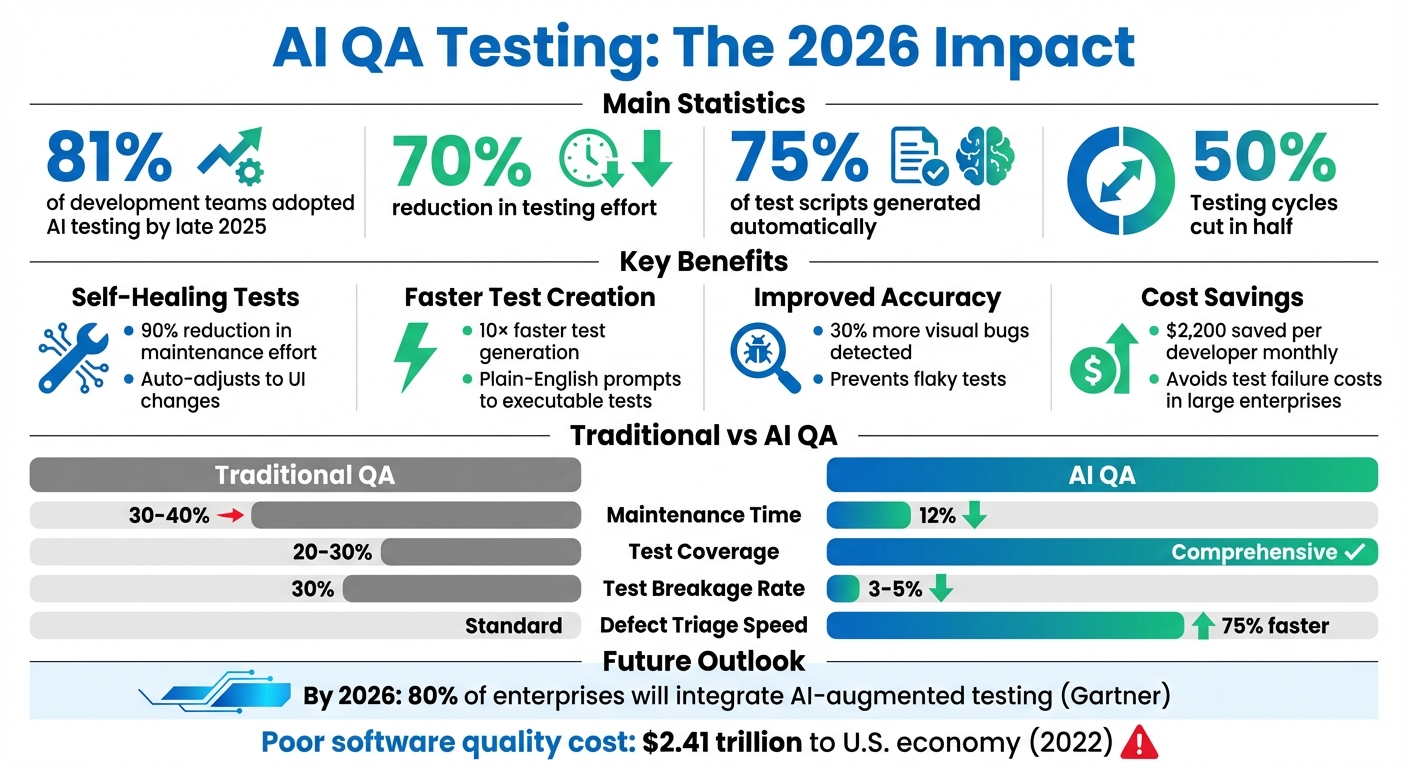
AI is transforming QA testing in 2026. Teams are releasing software faster, but outdated testing methods can't keep up. AI-powered tools now handle test creation, maintenance, and execution, reducing effort by up to 70%. By late 2025, 81% of development teams had already adopted AI testing, cutting testing cycles in half and generating 75% of scripts automatically.
Key benefits include:
- Self-healing tests: AI adjusts to UI changes, reducing maintenance by 90%.
- Faster test creation: Generative AI builds tests 10× faster from plain-English prompts.
- Improved accuracy: AI detects 30% more visual bugs and prevents flaky tests.
- Cost savings: Large enterprises save $2,200 per developer monthly by avoiding test failures.
Platforms like Rock Smith simplify the process with AI agents that discover and execute test flows, semantic targeting, and real-time execution. Teams can start testing in minutes with no-code tools, track progress with dashboards, and integrate seamlessly into CI/CD pipelines. The result? Faster releases, fewer defects, and more efficient QA workflows.
AI QA Testing Benefits: Key Statistics and ROI Metrics for 2026
AI-Powered Test Automation: Self-Healing + Visual Testing - Selenium & Playwright
Why Use AI for QA Testing Automation
Traditional QA automation often hits a wall when teams find themselves dedicating 30–40% of their time to maintenance, while test coverage lingers at just 20–30%. Even small changes, like tweaking a CSS class or moving a button, can cause scripts to fail. These flaky tests can cost large enterprises an estimated $2,200 per developer, per month.
AI steps in to tackle these issues by focusing on the intent behind user actions instead of relying on fragile implementation details. Unlike traditional methods that depend on XPaths or CSS selectors, AI uses semantic understanding to identify elements - even when IDs or paths change. This "self-healing" capability can reduce maintenance efforts by up to 90%. For example, Microsoft’s internal AI systems identified 49,000 flaky tests in 2025, preventing about 160,000 false failures that could have disrupted the delivery pipeline. These advancements highlight how AI shifts the focus from manual script maintenance to precision-driven automation.
AI-powered testing also introduces diff-aware capabilities, which limit regression runs to only the tests that matter, cutting cycle times by 70%. Bloomberg’s engineering teams reported similar efficiency gains by using AI to stabilize flaky tests through clustering and heuristic analysis. Looking ahead, Gartner predicts that by 2026, 80% of enterprises will have integrated AI-augmented testing into their software delivery processes.
Benefits of AI in QA Automation
AI’s impact on QA automation goes far beyond just reducing maintenance. One major advantage is autonomous test generation. By analyzing requirements, user stories, or OpenAPI specifications, AI can create comprehensive test scenarios that cover edge cases human testers might miss - all without manual scripting. AI-powered visual testing also detects 30% more visual bugs than traditional manual inspections.
Another game-changer is how AI makes testing more accessible. No-code AI tools let product managers and designers build tests using natural language prompts. This approach addresses the scalability challenges posed by a shortage of specialized Software Development Engineers in Test (SDETs). As Don Jackson, Agentic AI Expert at Perfecto, puts it:
"Some of the best testers I've known in my career are the worst scripters... Wouldn't it be amazing if I could have my best testers be able to do automation?"
AI also enhances failure analysis. When tests fail, AI doesn’t just flag vague errors like "element not found." Instead, it digs deeper, pinpointing root causes such as a 500 error in a specific API, offering actionable insights for faster resolution.
Problems with Traditional QA Automation
The limitations of traditional QA automation stand in stark contrast to AI’s capabilities. Manual workflows are time-intensive and don’t scale effectively. Writing test scripts can take hours - or even days - and these scripts often break with the slightest UI changes, locking teams into endless maintenance cycles. Traditional methods also struggle to adapt to distributed systems or complex microservices, leaving critical areas untested.
The cost of poor software quality only makes matters worse. In 2022, it was estimated that poor-quality software cost the U.S. economy $2.41 trillion, with $1.52 trillion tied to technical debt. These inefficiencies highlight why AI is so impactful. By automating execution, maintenance, and failure analysis, AI allows QA engineers to shift their focus from writing scripts to overseeing strategy, transforming the role of QA from reactive to proactive.
Key AI Technologies Changing QA Testing
In 2026, three standout AI technologies are transforming how QA automation is approached, moving beyond static scripts to systems that adapt and improve in real time.
AI-driven test flow generation is making test creation faster and more intuitive. Using Large Language Models, this technology converts plain English instructions into executable tests. For instance, instead of manually coding, a product manager can simply type, "Submit the form with a valid email", and the AI will break it down into actionable steps - like filling out fields, clicking buttons, and verifying results. Teams have reported creating end-to-end tests up to 10 times faster. On top of that, the AI generates realistic test data on the fly, such as names with special characters or international phone numbers, ensuring edge cases are covered - something static datasets often miss. These advancements are at the heart of Rock Smith's advanced QA solutions.
Autonomous AI agents are another game-changer, operating in a continuous observe-plan-act-learn loop. Unlike traditional scripts that rigidly follow predefined steps, these agents dynamically adjust based on the application's state. They observe, plan the next action, execute it, and learn from the outcome. For example, if a UI element changes, the agent automatically analyzes and updates the test step in real time. This "self-healing" ability significantly reduces the need for maintenance. Don Jackson, an Agentic AI Expert at Perfecto, explains:
"Think about how hard that would be to script today".
Visual intelligence and semantic targeting are helping make tests more robust. Instead of relying on fragile CSS selectors, visual AI identifies elements based on their function and appearance. For instance, it can recognize a "login button" regardless of how it’s implemented. This ensures tests validate what users actually see, catching issues like overlapping elements or misaligned text that functional scripts might overlook. Together, these technologies form the backbone of Rock Smith's next-generation automation efforts.
How to Automate QA Testing with Rock Smith
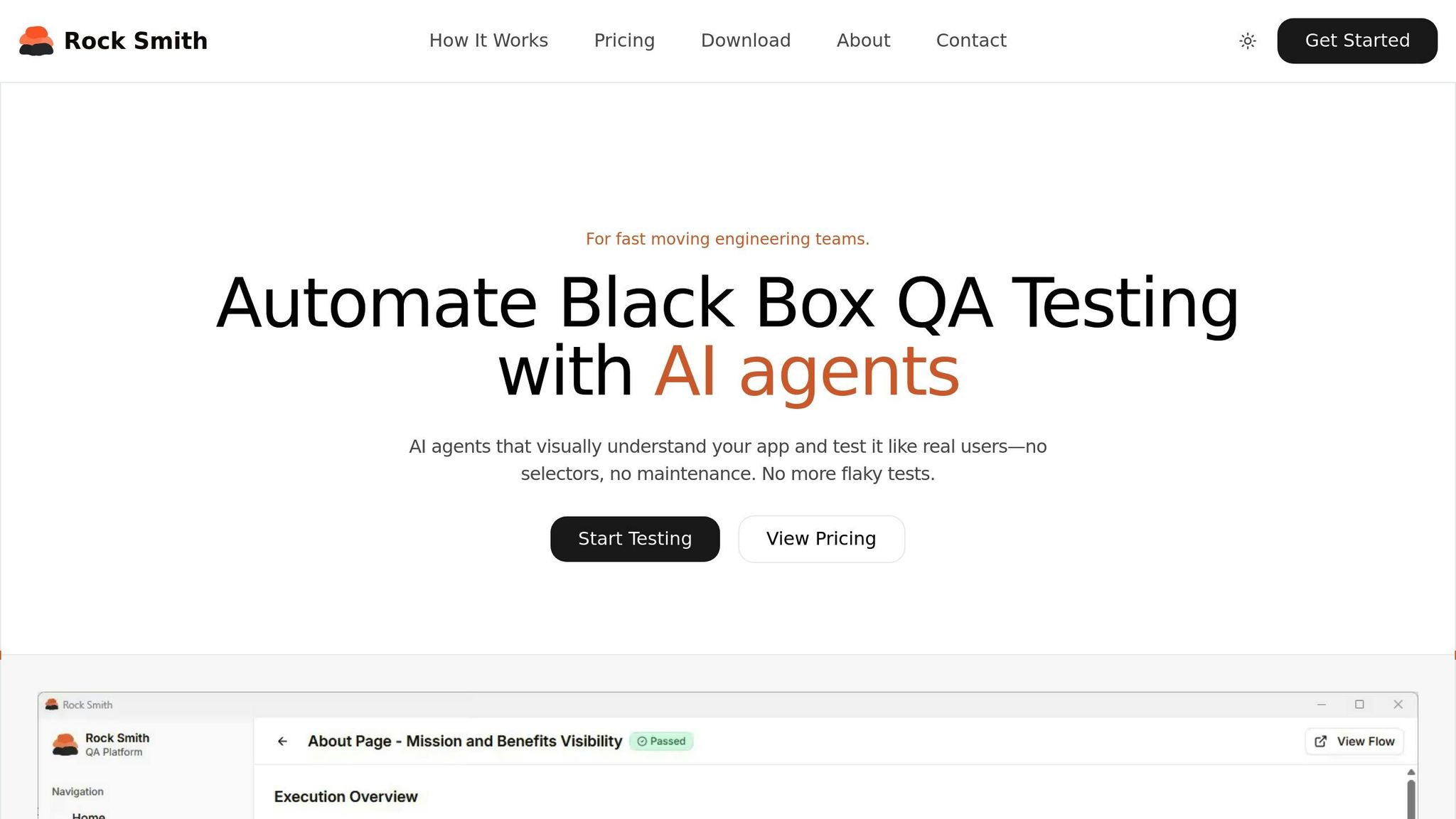
Rock Smith simplifies the challenges of traditional QA automation by using AI-driven test flows. The platform enables secure testing for internal applications, staging environments, and localhost setups without exposing sensitive data to the cloud. Here's how you can get started with Rock Smith to enhance your QA testing process.
Step 1: Create Your Rock Smith Account and Select a Plan
Begin by visiting the Rock Smith website and clicking "Start Testing" or "Get Started" to sign up. After creating your account, download the Rock Smith Desktop app to run tests locally, ensuring your data stays secure.
Rock Smith offers three pricing options, designed to cater to different team sizes and testing needs:
| Plan | Price | Credits Included | Best For | Overage Rate |
|---|---|---|---|---|
| Pay-As-You-Go | $0.10 per credit | Minimum 50 credits ($5) | Small teams with occasional testing | N/A |
| Growth | Contact for pricing | 550 credits/month | Teams with regular testing needs | $0.09/credit |
| Professional | Contact for pricing | 2,000 credits/month | High-volume testing operations | $0.06/credit |
Each plan includes features like AI-powered test flows, semantic targeting, visual intelligence, automated discovery, 12 assertion types, and real-time execution. If you choose the Pay-As-You-Go plan, credits remain valid for up to a year.
Step 2: Configure Your Application for Testing
Once your account is set up, configure your application settings to take advantage of Rock Smith's secure local testing. The platform's local browser execution ensures safe testing for internal tools and staging environments. Semantic targeting minimizes maintenance by automatically adapting tests to UI changes.
Rock Smith's visual intelligence feature identifies key UI elements, making your tests more resilient to updates. Additionally, you can create test personas to simulate various user behaviors. For instance:
- Power User: Focused on keyboard shortcuts and efficiency.
- Mobile Tester: Emphasizes touch-based navigation.
- New User: Explores the application as a first-time user.
Step 3: Build and Customize AI-Powered Test Flows
With your application configured, you can generate AI-powered test flows tailored to your needs. Simply describe the test scenario in plain English, and the AI will create the steps, populate fields, and validate outcomes.
Rock Smith automatically generates 14 test types to cover a wide range of scenarios, including boundary values, invalid inputs, Unicode characters, and security tests like XSS and SQL injection. You can further modify these flows to align with specific user personas or unique testing requirements.
Step 4: Run and Monitor Tests in Real-Time
During execution, Rock Smith provides live updates with screenshots and AI-generated reasoning for each test step. This transparency helps your team understand the AI's decisions and actions during the test.
The platform also includes a quality metrics dashboard that tracks key data like pass/fail rates, execution history, and trends. These insights are crucial, especially when you consider that catching bugs early can save significant costs - up to 100 times less than fixing them later. With 81% of development teams already integrating AI into their testing workflows, real-time monitoring ensures you maintain high software quality while keeping pace with development timelines.
sbb-itb-eb865bc
Best Practices for Scaling AI QA Automation with Rock Smith
Scaling QA automation across multiple teams and projects requires a modular test framework. This approach ensures that test flows remain reusable and adaptable as your codebase grows. Rock Smith's AI-driven capabilities automatically adjust to UI changes, making it easier to focus on high-impact test cases.
Start by automating high-priority areas - like login processes, checkouts, and data forms that are more prone to errors. This strategy not only reduces risks but also delivers faster ROI, showcasing the value of automation to stakeholders. For example, in October 2025, GE Healthcare managed to generate 240 automated tests in just three days - a task that previously took 22 days when done manually.
To make a stronger case for scaling QA efforts, align them with business metrics rather than just technical ones. With 81% of executives linking software quality directly to customer satisfaction and revenue, it’s clear that testing strategies should support KPIs like uptime, Mean Time to Detect (MTTD), and customer retention. This alignment helps justify investments in automation while keeping everyone focused on meaningful outcomes.
Reducing Test Maintenance with AI
Test maintenance often consumes a large chunk of QA resources, but Rock Smith's self-healing features significantly reduce this burden. Using "Maintain Agents", the platform automatically detects changes and updates test steps without requiring manual intervention. This can cut maintenance efforts by up to 80%, while also lowering test breakage rates from around 30% in traditional frameworks to just 3–5%.
Rock Smith also leverages visual intelligence, which ignores minor rendering differences while catching important UI changes across devices and resolutions. This eliminates the "flaky" test failures that are common in traditional automation setups. When tests do fail, the platform’s diagnostic intelligence steps in, performing automated root cause analysis in seconds. It processes logs, screenshots, and performance metrics all at once - a task that would typically take 30–60 minutes if done manually.
To streamline processes further, focus on building reusable test flows by organizing tests around common user journeys and critical edge cases. Rock Smith's NLP-driven test creation allows you to describe scenarios in plain English, making it easy to create variations without duplicating effort. As your regression suite grows, the AI evaluates code changes and runs only the most relevant tests, avoiding the "bloat" that can slow release cycles. This level of automation fosters better collaboration across teams while maintaining efficiency.
Collaboration Between Teams
Rock Smith’s self-healing capabilities and modular test flows also enhance collaboration among teams. With plain-English test authoring, non-technical stakeholders can actively participate in the testing process, ensuring broader contributions and engagement.
Integrating Rock Smith into your CI/CD pipeline allows teams to catch issues early - during the commit or pull request phase - rather than after a release. Initially, AI-powered tests can run alongside existing suites to validate their reliability without disrupting deployments. This "shift-left" approach helps teams identify bugs earlier, saving time and reducing costs since fixing issues at this stage is 100 times cheaper than addressing them post-release.
To maintain accuracy, establish HITL (Human-in-the-Loop) processes where QA leads review AI-generated fixes. This ensures rapid defect classification while eliminating repetitive tasks. The role of QA is evolving, with teams moving from writing fragile scripts to becoming "Quality Strategists" who guide AI systems and interpret broader risk insights. Sharing Rock Smith's quality metrics dashboard across teams - covering pass/fail rates, execution trends, and coverage gaps - creates transparency and keeps everyone aligned on quality goals.
Common Challenges in AI Test Automation and How to Solve Them
AI-powered QA automation isn't without its hurdles. It often grapples with issues like opaque decision-making, data security concerns, and a steep learning curve for teams. To tackle these, it’s crucial to implement audit trails and model logs, which provide transparency and traceability. Using clean, production-like training data is equally important, as poor-quality data can lead to misleading test results and misplaced priorities. A smart starting point? Focus on high-value regression and API tests to establish initial trust in the AI system.
Another challenge is the shift in mindset required for QA professionals. Moving from traditional script writing to supervising AI-driven processes demands retraining. Teams need to adapt to roles like curating prompts, validating outputs, and identifying edge cases rather than crafting brittle scripts. Beyond these technical challenges, regulatory compliance also demands attention.
Handling Data Privacy and Security Concerns
When AI tools deal with sensitive information, such as in healthcare or finance, data privacy becomes a major concern. AI models often need access to Personally Identifiable Information (PII) or Protected Health Information (PHI) to create realistic test scenarios, which can introduce compliance risks under laws like GDPR and HIPAA. A practical solution is to use synthetic data generation and automated masking. Tools like Rock Smith can help teams create test data that mimics real-world patterns without exposing actual customer information.
To further protect sensitive data, implementing Role-Based Access Control (RBAC) is key. This restricts access to AI testing platforms and sensitive artifacts. For teams handling regulated data, Human-in-the-Loop (HITL) processes can be a game-changer. In this approach, subject matter experts review AI-generated tests for compliance-sensitive scenarios and high-risk business logic, ensuring that every decision made by the AI is auditable and transparent. As Qadence emphasizes:
"Governance is non-negotiable. Synthetic data, masking, model logs, and audit trails ensure AI-generated tests are compliant with PII/PHI regulations".
Managing Initial Setup and Learning Curve
Getting started can feel overwhelming, but the key is to begin with tasks that deliver the most value - like automating smoke tests or regression tests for critical features - before expanding the AI's role. Tools like Rock Smith simplify the process by offering plain-English test authoring, allowing team members to describe scenarios in natural language, which the AI then converts into executable test flows.
Integrating AI testing into existing CI/CD pipelines (e.g., GitHub Actions, Jenkins, GitLab) is another way to streamline workflows without sacrificing speed. For instance, Rock Smith’s seamless CI/CD integration enables teams to catch issues during commits or pull requests, ensuring that daily deployments remain uninterrupted.
It’s also important to set clear, measurable goals. For example, Bloomberg engineers successfully reduced their regression cycle time by 70% using AI-driven heuristics. This kind of targeted approach can make the learning curve much more manageable while delivering tangible results.
Conclusion
AI is reshaping QA testing by drastically reducing maintenance efforts - cutting it from 80% of the lifecycle to just 12%. This shift allows teams to focus more on strategic exploratory testing, driving better results and innovation.
Rock Smith combines autonomous test generation, visual intelligence, and semantic targeting, all within an easy-to-use platform. Teams can write tests in plain English, run them locally in browsers, and let AI handle application updates. This leads to test creation that's up to 9× faster and defect triage that's 75% quicker.
Joe Colantonio, Founder of TestGuild, explains it perfectly:
"AI won't replace QA engineers. But it WILL change what they do: less time writing/maintaining scripts, more time on exploratory testing and strategy".
This isn't about replacing human expertise; it's about enhancing it. QA professionals take on roles as AI supervisors - creating prompts, validating results, and ensuring tests reflect real user experiences. These advancements highlight the practical benefits of AI in testing.
By 2026, 80% of enterprises are expected to implement AI-augmented testing. The real question isn't whether to adopt AI but how quickly you can make it part of your workflow. Rock Smith offers flexible pricing to suit both startups and large enterprises, starting at just $0.10 per credit on Pay-As-You-Go plans, with Professional plans providing 2,000 credits per month. Begin with high-impact regression tests, integrate seamlessly into your CI/CD pipeline, and speed up releases while minimizing defects.
Step into the future of QA with Rock Smith - where automation meets adaptability - and take your testing to the next level today.
FAQs
How does AI enhance the accuracy and efficiency of QA testing in 2026?
AI has transformed QA testing by making it more accurate and efficient through automation. Instead of depending on fragile, manually written scripts, AI-powered tools can automatically generate realistic test cases by analyzing requirements, code, or even plain-language descriptions. This approach not only minimizes human error but also ensures that tests align closely with product goals and provide better overall coverage.
These AI-driven systems go a step further by monitoring changes in user interfaces and APIs. They can automatically update selectors and repair broken steps, saving teams from tedious manual adjustments. Plus, by intelligently prioritizing tests based on their impact, they reduce maintenance efforts and cut down on false positives. The result? Faster, more reliable testing cycles, clearer defect identification, and quicker root-cause analysis.
When integrated into CI/CD pipelines, AI enables QA teams to achieve broader test coverage, faster feedback cycles, and speedier releases - all while maintaining high-quality standards.
What are the main features of Rock Smith's AI-powered test automation platform?
At the moment, there isn't detailed information available about the features of Rock Smith's AI-powered test automation platform. If you can provide additional details or point to a source outlining its capabilities, I'd be glad to break down and highlight the key aspects for you. Feel free to share more information so I can assist further!
What are the best strategies for integrating AI into QA testing processes?
Integrating AI into QA testing might feel overwhelming at first, but breaking it down into smaller, actionable steps can make the process much smoother. Start by pinpointing the main challenges in your current workflow - whether it's lengthy test cycles, unreliable scripts, or other bottlenecks. Once you know the pain points, set clear, achievable goals for how AI can help. Begin with small changes, such as leveraging AI to assist in drafting and maintaining test cases. Over time, you can explore more advanced options like self-healing tests or even autonomous testing agents.
A key part of this process is adopting a human-in-the-loop approach - this means having a person review AI-generated outputs before they’re implemented to ensure accuracy and reliability. To keep everything on track, establish solid governance practices. These might include generating synthetic data, keeping detailed logs, and creating audit trails to stay compliant with regulations and closely monitor how the AI behaves.
By introducing AI tools step by step, emphasizing strong oversight, and focusing on measurable results - like fewer maintenance headaches and faster release cycles - teams can successfully integrate AI into their QA processes. The payoff? Improved speed, better test coverage, and greater reliability.