Localhost Testing: Common Security Risks And Fixes
Protect your local development: avoid CORS and DNS rebinding, bind services to 127.0.0.1, use HTTPS, validate Host headers, and enforce auth.

Localhost Testing: Common Security Risks And Fixes
Think localhost is secure? It’s not. While localhost testing feels safe, it comes with hidden risks that could compromise your development environment and production systems. From CORS misconfigurations to DNS rebinding attacks, these vulnerabilities can expose sensitive data or even execute malicious code on your machine.
Here’s what you need to know:
- CORS Issues: Overly permissive settings like
Access-Control-Allow-Origin: *can allow malicious sites to interact with your local server. - DNS Rebinding: Attackers can trick your browser into treating their domain as a local one, bypassing security policies.
- Command Injection: Poorly secured APIs can let attackers execute harmful commands.
- API Exposure: Binding services to
0.0.0.0instead of127.0.0.1makes them accessible to external networks.
Key Fixes:
- Use strict CORS configurations and validate origins precisely.
- Implement Host Header validation to block unauthorized requests.
- Bind services to 127.0.0.1 to restrict access.
- Enable HTTPS locally using tools like
mkcert. - Enforce strong authentication for local services.
Bottom line: Treat localhost as you would a live production environment. Securing it now prevents future vulnerabilities from slipping into production.
Common Security Risks in Localhost Testing
CORS Misconfigurations
Developers often loosen CORS settings during localhost testing to bypass Same-Origin Policy restrictions. While this might seem convenient, it opens the door to serious vulnerabilities. A particularly dangerous setup combines Access-Control-Allow-Origin: * with Access-Control-Allow-Credentials: true, which allows any website to send authenticated requests to your local server.
The problem becomes worse with poor validation logic. For example, simple string matching - like checking if an origin ends with "localhost" or starts with "stripe.com" - can be bypassed using cleverly crafted domains, such as attackerstripe.com. The earlier-discussed Cognita vulnerability is a prime example of how such misconfigurations can lead to Remote Code Execution when paired with other weaknesses.
Chrome has taken steps to mitigate some CORS exploits by defaulting cookies to SameSite=Lax. However, browsers like Firefox and Safari may still be susceptible to certain bypass techniques. For instance, in August 2025, researchers demonstrated how a default Rails 6 app with the web-console gem and a wildcard CORS configuration could be exploited. A malicious website used fetch to make a request to a non-existent local path, extracted a session identifier from the resulting 404 error page, and sent a PUT request to the console's REPL endpoint to execute arbitrary Ruby commands.
CORS misconfigurations are just one aspect of localhost testing risks. DNS rebinding attacks present another significant threat.
DNS Rebinding Attacks
DNS rebinding takes advantage of the trust browsers place in local networks. Here’s how it works: a malicious domain initially resolves to a public IP, allowing the browser to load JavaScript from that domain. Then, the attacker changes the DNS record to point to 127.0.0.1 (or another local IP), tricking the browser into treating the local service as part of the same origin. This effectively bypasses the Same-Origin Policy.
Jaroslav Lobacevski, a security researcher at GitHub Security Lab, explains the risk:
"Running something on localhost completely shields it from the external world... they miss that the browser may also become the gateway through which unsolicited visitors get access."
In June 2025, researchers uncovered a path traversal vulnerability in the Deluge BitTorrent client's WebUI (patched in version 2.2.0). Attackers exploited an unauthenticated /js endpoint to read sensitive configuration files like web.conf via DNS rebinding. The attack targeted the 0.0.0.0 address on Linux and macOS systems, bypassing Same-Origin Policy protections. Since the 0.0.0.0 address can sometimes evade browser safeguards against public-to-local network requests, DNS rebinding often goes unnoticed by security tools due to its specific timing and environmental requirements.
DNS rebinding is a significant risk, but it’s not the only one. Exposed local APIs present another avenue for potential attacks.
Command Injection and API Exposure
While DNS rebinding exploits browser trust, unsecured APIs expose local services to network-based threats. Local applications often run with elevated privileges, and if their APIs are not properly secured, the consequences can be severe. A common mistake is binding APIs to 0.0.0.0 instead of restricting them to 127.0.0.1. This makes the local server accessible to anyone on the network.
The Cognita vulnerability highlights how these issues can combine. In this case, the application was bound to 0.0.0.0:8000 with Uvicorn's --reload flag enabled. This allowed attackers to remotely overwrite __init__.py files via an unsafe CORS policy. The server's automatic reload feature then executed the modified code, resulting in Remote Code Execution.
Kevin Stubbings, a security researcher at GitHub Security Lab, offers this advice:
"If you don't want to add authentication for a simple application, then you should check that the host header matches an approved host name or a local name."
A notable example of API exposure occurred in July 2019, when Zoom's local web server (running on port 19421) was found to have a CSRF vulnerability. This flaw allowed a malicious website to force users into video calls with their cameras activated - without their consent. The issue arose because the local API lacked both authentication and proper input validation. With an estimated one billion users running applications that install local web servers, such vulnerabilities are a widespread concern.
sbb-itb-eb865bc
Exploiting Basic SSRF Vulnerability Against Local Server | PortSwigger Lab #ssrf #portswigger

How to Fix Localhost Security Risks
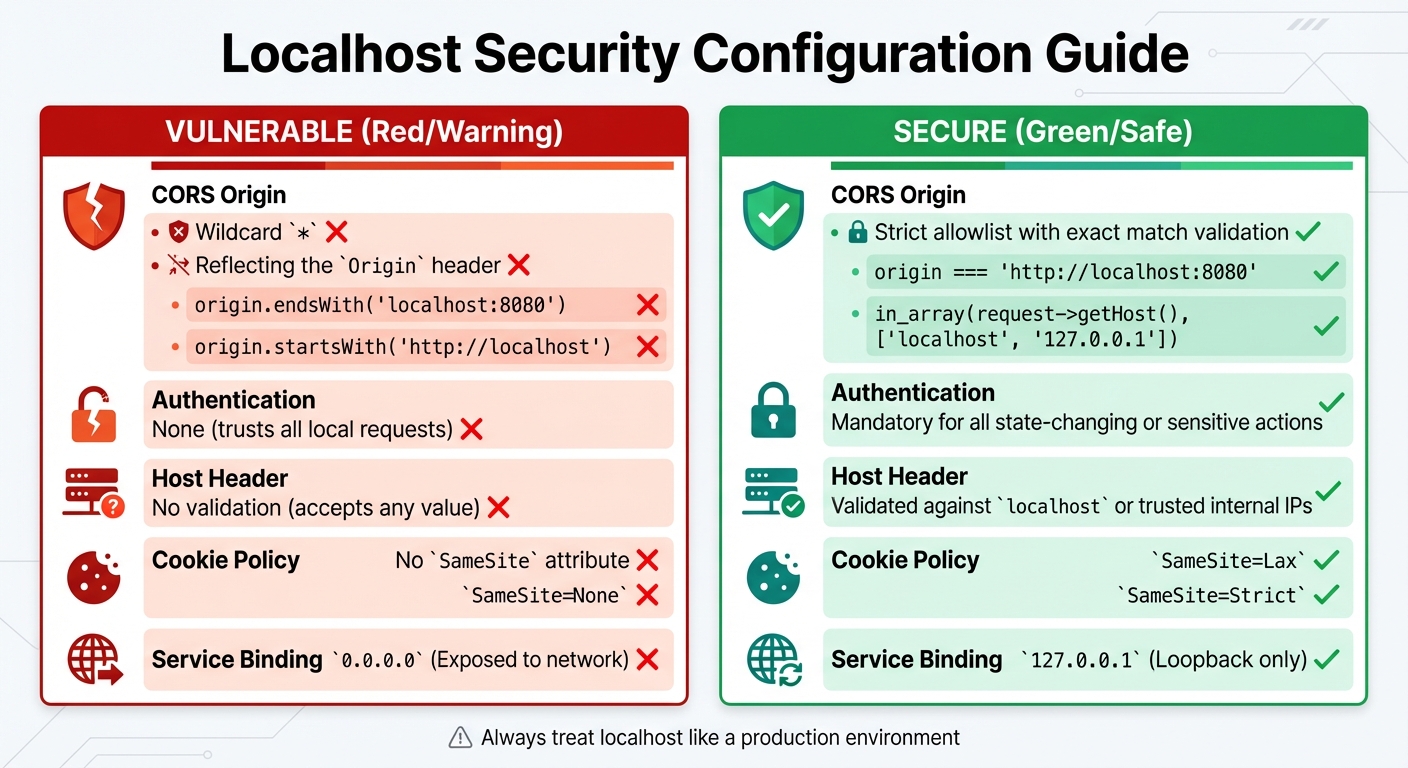
Localhost Security: Vulnerable vs Secure Configurations
Securing CORS and Host Headers
To address CORS vulnerabilities, always use strict origin matching. Avoid configurations like Access-Control-Allow-Origin: * combined with Access-Control-Allow-Credentials: true, as modern browsers typically reject this setup. Instead, specify exact origins in your configuration. Don’t rely on checks like startsWith, endsWith, or contains, as attackers can exploit these with domains resembling trusted ones, such as attacker-myapp.com or maliciouslocalhost:8080.
Host header validation is just as important. Ensure your application checks that the Host header matches an approved list of values. For example, Laravel developers can use the TrustHosts middleware to define allowed hostnames. Be cautious with functions like URL::forceRootUrl(Request::getSchemeAndHttpHost()), as they can be manipulated in attacks.
| Configuration Type | Logic Example | Security Status |
|---|---|---|
| Vulnerable (Suffix) | origin.endsWith('localhost:8080') |
Insecure (Attackers can use maliciouslocalhost:8080) |
| Vulnerable (Prefix) | origin.startsWith('http://localhost') |
Insecure (Attackers can use http://localhost.attacker.com) |
| Secure (Exact) | origin === 'http://localhost:8080' |
Secure (Requires exact match of the trusted origin) |
| Secure (Allowlist) | in_array(request->getHost(), ['localhost', '127.0.0.1']) |
Secure (Prevents rebound domain names) |
Additionally, defending against DNS rebinding attacks requires its own focused measures.
Protecting Against DNS Rebinding Attacks
To combat DNS rebinding, enforce strong authentication to block unauthorized access. Attackers can’t exploit local services if they lack valid credentials. As Jaroslav Lobacevski from GitHub Security Lab puts it:
"Never assume a service is safe just because it's 'only running locally.' Always enforce strong, password-based authentication - even for internal services or development tools".
Using HTTPS/TLS for local services adds another layer of protection. With HTTPS, DNS rebinding often fails since browsers validate the TLS certificate against the domain name. If the IP address resolves to a local one, the certificate won’t match, and the connection gets blocked. Modern browsers like Chrome and Edge also follow the W3C "Local Network Access" specification, requiring CORS preflight checks when a public site accesses a private address space.
For further safety, configure local DNS servers or use DNS Response Policy Zones (RPZ) to prevent external domains from resolving to private IPs. Browser extensions like NoScript, which includes an Application Boundary Enforcer (ABE), can stop external pages from making requests to local IPs. Research highlights the scale of this issue: 66% of printers (165 million devices) and 75% of IP cameras (160 million devices) remain exposed to DNS rebinding attacks.
Preventing Command Injection and API Exposure
To secure APIs, bind services exclusively to 127.0.0.1 rather than 0.0.0.0. Binding to 0.0.0.0 exposes your local server to external networks, bypassing browser protections on systems like Linux and macOS.
Sanitize inputs thoroughly using Static Application Security Testing (SAST) tools, which can detect validation issues and block directory traversal attempts (e.g., using ".." to escape intended paths). Gal Elbaz, Co-Founder & CTO at Oligo Security, advises:
"Determine whether vulnerable functions are executed: Go further than simply identifying CWEs and CVEs. Monitor whether specific functions that introduce vulnerabilities are called within applications".
To prevent unauthorized cross-site requests, implement anti-CSRF measures like the Synchronizer Token Pattern and configure cookies with SameSite=Lax or SameSite=Strict. These settings ensure that cross-site requests can’t reach your local endpoints. Development environments, especially when using tools like Uvicorn with the --reload flag, require extra vigilance. Arbitrary file write vulnerabilities in such setups can escalate to remote code execution if changes are automatically executed.
| Security Feature | Vulnerable Configuration | Secure Configuration |
|---|---|---|
| CORS Origin | Wildcard * or reflecting the Origin header |
Strict allowlist with exact match validation |
| Authentication | None (trusts all local requests) | Mandatory for all state-changing or sensitive actions |
| Host Header | No validation (accepts any value) | Validated against localhost or trusted internal IPs |
| Cookie Policy | No SameSite attribute or SameSite=None |
SameSite=Lax or SameSite=Strict |
| Service Binding | 0.0.0.0 (Exposed to network) |
127.0.0.1 (Loopback only) |
Best Practices for Secure Localhost Testing
Treat Localhost Like a Public Environment
Don't fall into the trap of thinking localhost is automatically secure. Treat your local environment with the same care you would a production system. For example, bind services to 127.0.0.1 to limit exposure, especially when using public networks like Wi-Fi.
Implement HTTPS locally using tools like mkcert. This not only mirrors production behavior but also ensures compatibility with modern browser APIs like Service Workers, Geolocation, and WebRTC, all of which require secure contexts. Additionally, third-party services such as Stripe or OAuth providers often depend on HTTPS to function correctly. By running mkcert -install, you can create a local Certificate Authority to generate certificates for custom domains (e.g., myapp.test). To further secure your setup, configure session cookies with SameSite=Lax or SameSite=Strict to reduce the risk of CSRF attacks. Mapping custom domains to localhost is another good practice, allowing you to test subdomain logic and cookie behavior effectively.
These steps create a secure foundation, paving the way for more advanced testing techniques.
Use AI-Powered Testing Tools
Once your local environment is secured, consider using AI-powered tools to uncover vulnerabilities that might otherwise go unnoticed. These tools excel at detecting breaches early, which can cut response costs significantly.
For instance, Rock Smith offers local browser execution to test internal and staging applications without exposing them to external networks. Its semantic targeting feature interprets your code's intent, reducing false positives by as much as 95%. The tool also generates test personas to simulate edge cases, mimicking real-world attack scenarios. Additionally, its visual intelligence feature maps out application data flows, helping to identify business logic flaws like IDOR and BOLA.
Monitor and Automate Security Testing
Securing localhost isn't a one-time task - it requires ongoing monitoring and validation. Continuous checks during development are essential. Integrating security checks into your IDE and CI/CD pipelines ensures every commit is validated. For example, in September 2025, OX Security analyzed the ERPNext open-source repository, flagging 398 alerts. Out of these, only 22 required immediate attention, while 30 vulnerable components were identified across 3,471 libraries, along with 5 secret exposures that traditional SAST tools missed.
Automating header validation is another critical step. Tools can help you detect missing or misconfigured headers like CSP, HSTS, and X-Frame-Options. Focus on tools that prioritize vulnerabilities based on whether the affected code is actually reachable or exploitable. After all, only 2% to 5% of security alerts typically represent high-risk issues.
Conclusion
Key Takeaways
Testing on localhost might feel safe, but it comes with hidden risks. For example, CSRF vulnerabilities exploit automatic cookie inclusion, allowing malicious websites to manipulate application states. Similarly, while using wildcard CORS headers (*) may seem like an easy fix for local port conflicts, it opens the door to serious security issues. Another concern is DNS rebinding attacks, where browsers are tricked into associating attacker-controlled domains with local IPs, effectively bypassing the Same Origin Policy.
Thankfully, the solutions are simple but require consistent application. For instance, replacing localhost with .test domains can mimic production cookie behavior more accurately. To counter CSRF risks, you can implement anti-CSRF tokens and configure session cookies with SameSite=Lax or Strict. Installing tools like mkcert allows you to enable HTTPS locally, which is essential for features like Service Workers, OAuth, and payment gateways that demand secure contexts. Additionally, configuring your local servers to enforce CORS preflights for all requests can block lateral attacks targeting IoT devices on your private network.
"Every shortcut we take locally, like using wildcard CORS headers, is a bug waiting to happen in production." - Rob Bogie, Software Developer
These points emphasize why security should always be a priority, even during local testing.
Final Thoughts
Treat your local environment with the same level of care as you would a public-facing one. Aligning your local setup with production security measures can help catch vulnerabilities early, before they impact real users. This is critical because millions of developers rely on local web servers, making their security a pressing issue.
To strengthen security practices, teams should embed checks throughout the development process. Tools like Rock Smith can assist by running local tests without exposing internal applications to external threats. They simulate realistic attack scenarios using semantic targeting and test personas. Ultimately, security isn’t an afterthought - it’s something you build into your workflow from the very start.
FAQs
How can I tell if my local server is exposed to my network?
To see if your local server is accessible on your network, try connecting to it from another device on the same network. Use the server's IP address and port number for this test. Another option is to scan your network for open ports, which could signal potential exposure. If you can access the server or detect open ports, it’s likely that your local server is exposed.
What’s the simplest way to stop DNS rebinding on localhost?
To keep your localhost environment safe from DNS rebinding attacks, the easiest approach is to establish local network access controls. This might involve adjusting browser or server settings to reject unusual DNS responses. You can also strengthen security by implementing DNSSEC or setting up firewall rules to stop IP address switching. These steps add a protective layer to your localhost setup.
What’s a safe CORS setup for local development?
When setting up CORS (Cross-Origin Resource Sharing) for local development, it's important to specify trusted origins rather than relying on a wildcard (*). For instance, you can configure Access-Control-Allow-Origin to a specific URL like http://localhost:3000 or any other defined local environment address. This approach minimizes risks such as unintended data exposure or potential CSRF attacks.
To take it a step further, consider using tools that enable HTTPS in your local environment. This not only boosts security but also helps replicate production settings more accurately.