How to Eliminate Flaky Tests in CI/CD Pipelines
Learn how to detect, diagnose, and fix flaky tests in CI/CD using stable environments, better test design, and AI-driven automation.

How to Eliminate Flaky Tests in CI/CD Pipelines
Flaky tests cause unpredictable results, wasting time and resources in CI/CD pipelines. They lead to unreliable test outcomes, delayed pull requests, and reduced developer trust in testing systems. Common causes include race conditions, hardcoded delays, and unstable environments.
Key Takeaways:
- Flaky tests disrupt workflows by creating false negatives and blocking releases.
- AI-powered tools like Rock Smith can identify and fix flaky tests using historical data and smart retries.
- Stable environments and better test design (e.g., avoiding
sleep()calls, mocking dependencies) reduce flakiness. - Tagging flaky tests and quarantining them prevents pipeline disruptions while fixes are implemented.
- AI-driven platforms lower flake rates significantly (e.g., from 22% to 0.6%) and reduce regression test times by up to 70%.
Actionable Steps:
- Use AI tools to detect and resolve flaky tests automatically.
- Standardize test environments with Docker or Kubernetes and lock dependencies.
- Improve test design with dynamic polling and independent test runs.
- Continuously monitor test health and maintain test code like production code.
Eliminating flaky tests ensures smoother CI/CD pipelines and faster, more reliable software delivery.
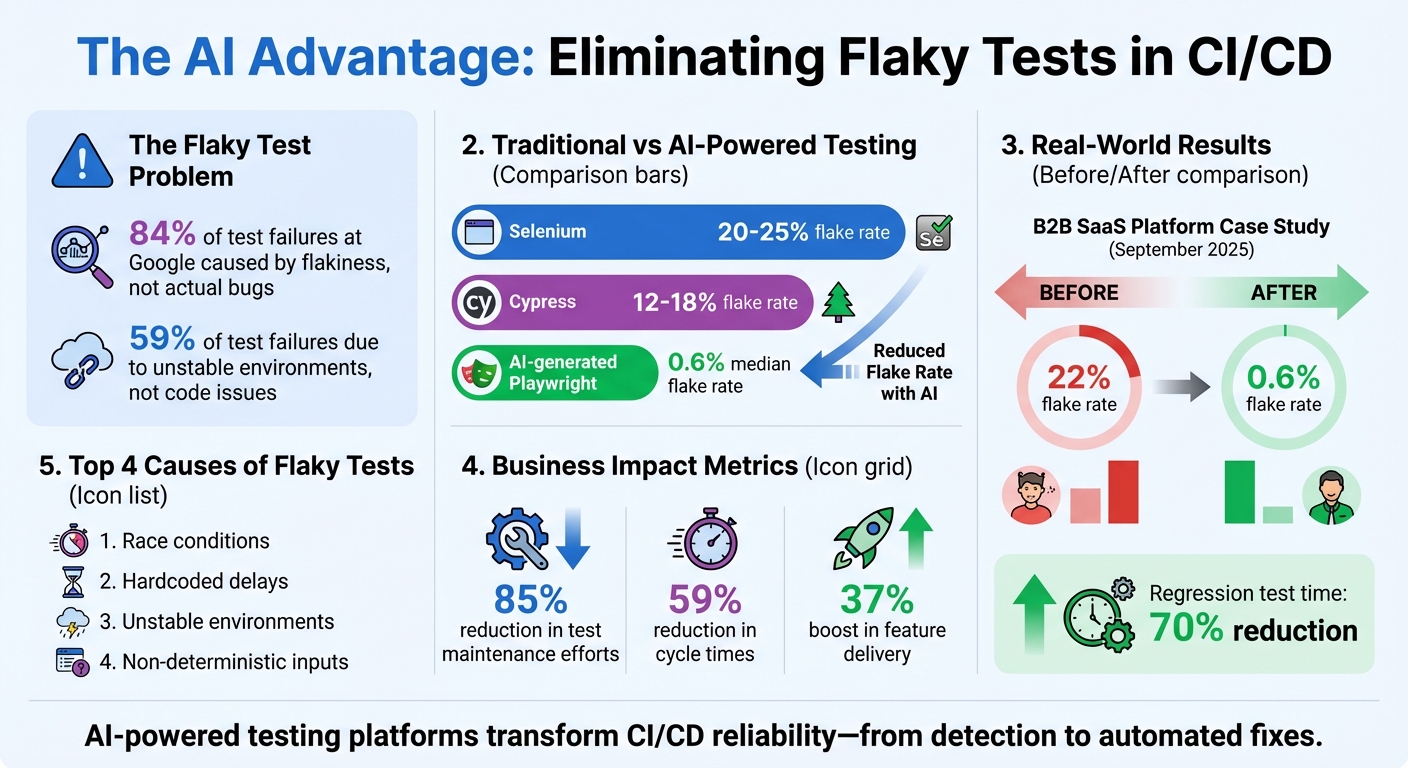
Impact of AI-Powered Testing on Flaky Test Reduction and CI/CD Performance
How to Detect and Diagnose Flaky Tests
Methods for Detecting Flaky Tests
One of the most effective ways to spot flaky tests is by setting up automatic retries. If a test fails initially but passes when re-run - without any code changes - that’s a clear sign of flakiness. Make sure your CI system flags these inconsistent results instead of simply re-running tests without further action.
Another useful approach is cron scheduling, which helps collect long-term statistical data. Running full test suites periodically can uncover those pesky intermittent failures. Establish clear thresholds: for instance, if a test has a failure rate above 1% or an intermittent failure rate over 5%, it’s worth investigating. If a test fails three times in a row, consider quarantining it for further analysis.
You can also tag tests suspected of flakiness with labels like @flaky. This separates them into dedicated CI jobs, ensuring they don’t block your primary deployment pipeline. As Nebojša Stričević from Semaphore wisely notes, "The first appearance of a flaky test is the best moment to fix it". These strategies not only help identify flaky tests but also streamline your pipeline for better efficiency.
Setting Up Pipelines for Better Visibility
To diagnose flaky tests effectively, your pipeline needs to capture detailed diagnostic data. For UI tests, this means collecting artifacts like screenshots, HTML dumps, and video recordings to document the application's state at the moment of failure. Supplement this with metadata logs, including system state, memory usage, CPU load, and environment variables, to identify patterns between failures and resource constraints.
To manage log size, increase logging verbosity only when tests fail. For example, in Node.js, you can use environment variables like DEBUG=* to capture detailed logs on demand. Tools like SSH debugging can also help you replicate the CI environment, making it easier to investigate flaky behavior interactively.
With all this rich data in place, AI tools can step in to transform the information into actionable insights.
Using AI for Flaky Test Analysis
AI-powered tools are game-changers when it comes to analyzing flaky tests. For example, Rock Smith’s AI analytics can cluster flaky behaviors by examining historical test data and failure logs. It groups tests based on common root causes, such as race conditions or non-deterministic timers. This eliminates much of the manual effort involved in combing through logs.
Another advantage is natural language querying, which allows developers to ask questions about flaky tests and get specific answers, like the file names, line numbers, and problematic assertions. Rock Smith’s visual intelligence and semantic targeting further simplify the process, helping teams pinpoint flakiness in even the most complex test suites - without having to sift through endless logs manually.
How to Fix Root Causes of Flaky Tests
Creating Stable Test Environments
Did you know that 59% of test failures are due to unstable environments rather than bugs in the code?. Tackling this issue starts with standardizing your test environments. Tools like Docker or Kubernetes can package your application along with its dependencies, ensuring consistent behavior across local setups, staging areas, and CI/CD pipelines. Lock down versions for everything - libraries, runtimes, OS images - so minor updates don’t throw unexpected surprises into the mix.
Infrastructure-as-Code (IaC) tools like Ansible or Puppet can help maintain uniform configurations across environments. For test data, stick to controlled datasets and include cleanup scripts or database rollbacks to restore the state after each test run. If your tests involve databases or message queues, Testcontainers can spin up Docker containers for these services, offering more reliable results compared to in-memory mocks.
"A recent survey found that 59% of test failures are caused by unstable or misconfigured environments, not by issues in the code itself." - BrowserStack
Once your environment is stable, the next step is to focus on designing tests that are built to avoid common pitfalls.
Improving Test Design and Implementation
Flaky tests often boil down to poor design choices. For instance, relying on sleep() calls can cause tests to fail when your CI environment runs slower than usual. Instead, use dynamic polling to wait for specific conditions to be met within a set timeout. This approach adapts to varying execution speeds and reduces unnecessary failures.
External dependencies, like third-party APIs, are another common pain point. Mock these using stubs or fakes to avoid network-related issues entirely. Tests should also run independently, in any order. To achieve this, reset databases and global variables in setup and teardown blocks to eliminate shared state problems. For non-deterministic inputs like Instant.now() or random number generators, inject fixed clocks or seeded values to maintain consistency.
If a test remains flaky and you can’t resolve it immediately, tag it with @flaky and move it to a separate suite. This way, it won’t block your main release pipeline, giving you time to address the issue without disrupting the workflow.
Using AI-Driven Test Flows
Once you’ve stabilized your environments and refined your test design, AI-driven tools can take your testing game to the next level. Rock Smith’s AI, for example, generates user-focused test flows that adapt seamlessly to UI changes. This reduces maintenance and eliminates common flakiness caused by unstable locators or timing issues.
The tool’s semantic targeting ensures tests focus on actual user actions rather than fragile elements like dynamic IDs or XPath selectors that can change between builds. Pair this with Rock Smith’s self-healing capabilities, and your test suite becomes smarter - it automatically adjusts to changes while maintaining reliability across all environments.
Eliminating Flakiness with AI-Powered Automation
How AI Improves Test Stability
AI-powered testing platforms address test flakiness by replacing fragile selectors with semantic targeting. Instead of relying on CSS chains or XPath that can break with every UI update, AI focuses on the intent behind each test action. This allows it to adapt automatically when elements in the user interface change.
For example, AI-generated Playwright tests have a median flake rate of just 0.6%, compared to the much higher rates of 20–25% for Selenium and 12–18% for Cypress. In September 2025, a B2B SaaS platform transitioned 1,500 Selenium tests to an AI-driven platform and saw its flaky test rate plummet from 22% to 0.6%. This shift also reduced regression test times by 70%. Rock Smith’s visual intelligence further enhances stability by identifying elements through user interactions, minimizing reliance on fragile code selectors.
This level of stability sets the stage for automated test maintenance.
Automating Test Maintenance with AI
AI doesn’t just improve test stability - it actively maintains your tests. By analyzing DOM snapshots, network activity, and logs, AI agents can distinguish real bugs from environmental noise. Advanced systems go a step further, identifying root causes, validating fixes through repeated test runs, and even opening pull requests with the solutions.
"With Chunk [AI agent] fixing flaky tests in the background, you can start your day with verified PRs waiting for review." – CircleCI
Rock Smith’s self-healing capabilities ensure that test flows are updated continuously as your application evolves. You can configure these updates to run on a schedule, such as daily at 10:00 PM, so stabilized tests are ready for review the next morning. Teams using AI-driven platforms have reported an 85% reduction in test maintenance efforts, allowing QA engineers to focus on exploratory testing instead of troubleshooting brittle scripts.
Once maintenance is automated, integrating Rock Smith into your CI/CD pipeline becomes the natural next step.
Integrating Rock Smith into CI/CD Workflows
Rock Smith’s stability and self-healing features make it an ideal addition to your CI/CD workflows. Begin by authorizing Rock Smith with your API token and linking it to your GitHub or GitLab repository. Then, define your test environment in a configuration file that outlines dependencies, databases, and required services. Schedule test runs to trigger on every commit, pull request, or at specific intervals.
You can also define operational parameters and coding standards to ensure that AI-generated fixes align with your team’s practices. Rock Smith integrates directly with your existing CI/CD tools, delivering real-time execution and quality metrics. This seamless integration provides immediate feedback on pipeline health, all without disrupting your workflow.
sbb-itb-eb865bc
Maintaining Long-Term Test Reliability
Continuous Monitoring and Governance
Keeping flaky tests in check requires the same level of attention as monitoring production systems. Use automated tools to identify tests that unpredictably alternate between passing and failing without any changes to the underlying code [13, 26]. It's also important to track the "flake rate" separately from the "failure rate." This distinction helps you prioritize which tests demand immediate fixes.
To minimize disruption, consider a quarantine policy for flaky tests. Tag these tests with markers like @flaky or move them to a separate suite. This prevents them from interfering with the main pipeline while they’re being investigated [6, 8]. Once quarantined, log them in your ticketing system and only mark them resolved after multiple successful runs. Tools like Rock Smith's quality metrics dashboard provide real-time insights into test suite health, enabling you to catch patterns early and address them before they escalate.
"The first appearance of a flaky test is the best moment to fix it." – Nebojša Stričević, Writer, Semaphore
Additionally, schedule periodic full-suite runs to uncover time-sensitive or load-related flakiness. These proactive measures ensure continued stability and build on earlier efforts to stabilize your testing process.
Treating Test Automation as Production Software
Test code deserves the same level of care as production code. Enforcing mandatory code reviews for test scripts can help developers spot flaky patterns during pull requests. Apply the same standards - like design principles, refactoring, and managing technical debt - that you use for production software [8, 2, 6].
Boost test reliability by incorporating high-verbosity logging and observability tools. Capture details like timestamps, system states, memory usage, and screenshots to make root cause analysis easier [8, 12, 6]. Another critical step is ensuring consistent, reproducible test environments. Design tests to be self-contained so they can independently set up and tear down their states, avoiding reliance on shared data or execution order [7, 12, 2].
Transitioning to AI-Powered Testing
Once your test suite is stable, consider transitioning to AI-powered automation. Start by replacing fragile, manually authored tests with AI-driven solutions. These tools, like Rock Smith, monitor UI changes and automatically adjust test logic, preventing failures caused by minor frontend updates. This approach can save significant time, eliminating hours of delays caused by flaky tests in CI pipelines.
Begin with the most problematic test suites - those with high flake rates or heavy maintenance needs. Migrate these to AI-powered tools like Rock Smith to take advantage of features like semantic targeting and self-healing capabilities. As your team gains trust in this approach, expand it across your entire suite. This shift frees engineers to focus on exploratory testing and feature development instead of troubleshooting brittle scripts.
How To Fix Flaky Tests In CI/CD Pipelines? - Cloud Stack Studio
Conclusion: Building Reliable CI/CD Pipelines with AI
Flaky tests are a major roadblock for smooth deployments, but AI-powered automation provides a way to tackle this challenge head-on. By employing tools that automate root-cause analysis, adjust test logic dynamically, and filter out unnecessary noise, teams can finally address the instability that often disrupts traditional testing frameworks. According to research, nearly 84% of test failures at Google were caused by flakiness, not actual code issues.
The impact of AI-driven solutions is clear. Case studies show that platforms leveraging AI can reduce flake rates significantly - from over 20% to less than 1% - while slashing regression times by as much as 70%. For example, a 2025 study highlighted how one team cut their flake rate from 22% to just 0.6% and reduced regression time by 70%. Teams have also reported up to a 59% reduction in cycle times and a 37% boost in feature delivery.
These numbers highlight the transformative potential of AI in stabilizing tests.
"Nothing derails team momentum more than flaky tests. Combining automatic flaky test detection with an AI assistant in your IDE helps you go from failure to fix without changing context." – CircleCI Blog
AI tools like Rock Smith seamlessly integrate into CI/CD workflows, offering features such as semantic targeting, continuous healing, and real-time execution monitoring. Let AI handle the headaches of debugging brittle selectors and timing issues, freeing your team to focus on building features. These advancements reinforce the shift toward AI-driven QA as the backbone of dependable CI/CD pipelines.
Identify high-flakiness test suites and transition them to AI-powered automation. This shift isn’t just about eliminating flaky tests - it’s about laying the groundwork for faster and more reliable software delivery.
FAQs
How does Rock Smith use AI to reduce flaky tests in CI/CD pipelines?
Rock Smith uses AI-powered automation to tackle the pesky problem of flaky tests in CI/CD pipelines. By digging into historical test data, logs, and environment metrics, it spots patterns that cause instability - like timing glitches, unreliable dependencies, or weak selectors. Once identified, the platform can predict which tests are likely to fail and isolate them before they run, ensuring the pipeline stays stable while flagging the issues for developers to review.
On top of that, Rock Smith’s autonomous test-maintenance engine steps in to handle fragile test code. It smartly replaces unreliable waits with better synchronization, builds stronger selectors, and simulates unstable APIs - all without needing manual intervention. This hands-off approach slashes flaky test occurrences, boosts overall test reliability, and keeps CI/CD pipelines running smoothly.
What are the best ways to design tests that reduce flakiness in CI/CD pipelines?
To cut down on flaky tests, aim to make them predictable and self-contained. Each test should operate independently, avoiding shared mutable states. Reset databases and use fresh fixtures or containers for every test to ensure a clean slate. Provide clear, fixed inputs - like setting seed values for random generators - to achieve consistent outcomes. Mock external services, network calls, and APIs tied to time-sensitive operations to remove unpredictability from outside sources. Keep tests brief, enforce timeouts, and design them to be idempotent, meaning they can run in any order without causing unintended side effects.
A consistent environment is just as crucial. Pin your dependencies to specific versions, rely on reproducible containers or virtual environments, and address those pesky “works on my machine” discrepancies. Leveraging AI-powered test automation tools can also be a game-changer. These tools can identify flaky patterns, suggest fixes, and even refactor unstable tests for you. By adopting these practices, you’ll be on your way to reducing flaky tests and keeping your CI/CD pipelines running smoothly and reliably.
Why is standardizing test environments important for reducing flaky tests?
Standardizing test environments is key to eliminating unpredictable variables that often lead to flaky tests. When every build operates on the same operating system, with identical libraries, configurations, network settings, and test data, the only thing that changes is the code itself. This level of consistency helps avoid random failures caused by mismatched dependencies, time zone differences, or resource limitations, ensuring tests run predictably every time.
A stable environment also boosts the performance of AI-powered test automation tools. With a consistent setup, these tools can focus on identifying real test issues rather than being misled by environment-related inconsistencies. This means quicker troubleshooting, fewer false positives, and more dependable CI/CD pipelines. By using containers, virtual machines, or cloud-based sandboxes, teams can lock down their environments and establish a reliable, repeatable testing process.