AI Root Cause Analysis for Test Failures
AI-driven test failure analysis combines logs, screenshots, visual reasoning, and semantic targeting to pinpoint root causes and cut debugging time.
AI Root Cause Analysis for Test Failures
When software tests fail, figuring out why can be a slow and frustrating process. QA teams often spend hours analyzing logs, screenshots, and histories to identify the issue. Failures can result from product bugs, flaky tests caused by UI changes, or unstable systems. This manual debugging process delays releases and distracts engineers from building new features.
AI simplifies this by automating failure analysis. It collects logs, screenshots, and data to create a timeline of events, then uses pattern recognition and visual analysis to pinpoint the cause. Tools like Rock Smith classify failures into categories - such as product bugs or automation errors - and provide actionable insights, reducing debugging time by up to 75%. Features like semantic targeting and self-healing tests help avoid false positives caused by minor UI changes.
AI Is Not Bad at Test Failure Analysis. Your Approach is!
How AI Identifies Root Causes of Test Failures
How AI Identifies Root Causes of Test Failures in 3 Steps
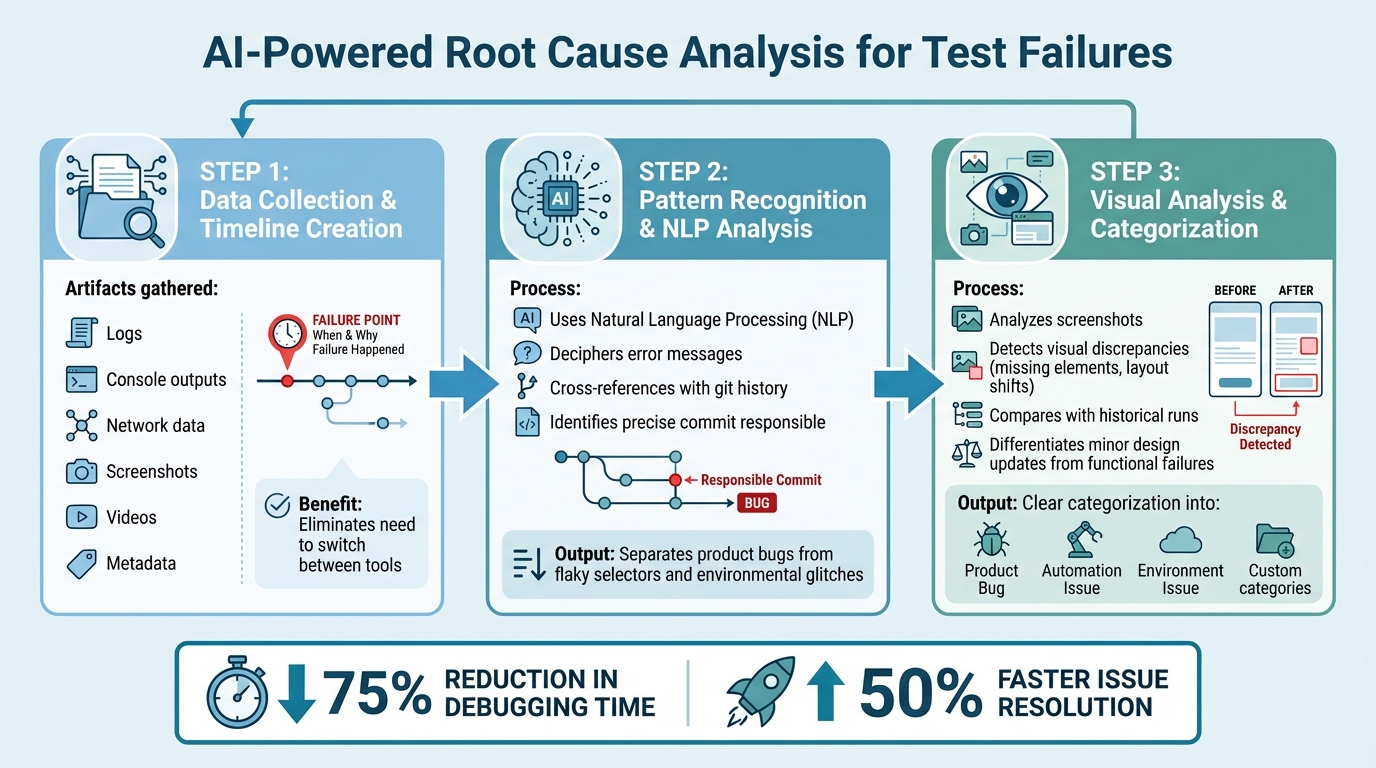
AI simplifies the process of identifying test failures by piecing together a complete failure timeline. It gathers artifacts like logs, console outputs, network data, screenshots, videos, and metadata, creating a single, unified timeline that pinpoints exactly when and why the failure happened. This eliminates the need for engineers to switch between tools, allowing them to focus on resolving the issue. This streamlined timeline becomes the foundation for accurately classifying failures.
Once the data is collected, AI applies pattern recognition to separate product bugs from issues like flaky selectors or environmental glitches. Using natural language processing (NLP), it deciphers error messages and cross-references them with git history to identify the precise commit responsible for the regression. These insights, drawn from textual and error data, are then enhanced by visual analysis.
"AI-powered systems deliver precise explanations: 'The checkout button moved from the top-right to bottom-center due to the responsive design update in commit #4521, affecting 47 related tests that need similar updates.'" - Virtuoso QA
Visual analysis takes this a step further by mimicking how a real user sees the interface. Instead of relying on fragile DOM selectors that often break with minor UI changes, AI assesses elements based on their visual appearance and semantic meaning. By analyzing screenshots, it detects visual discrepancies like missing elements or layout shifts. This allows the system to differentiate between minor design updates - which it can self-heal - and actual functional failures that need immediate attention. Comparing current visuals with historical runs helps identify deviations from expected behavior.
The end result is a clear categorization of failures into actionable groups such as Product Bug, Automation Issue, Environment Issue, or other custom-defined categories. Teams can then use bulk actions to address similar failures at once, cutting down triage time significantly. Companies leveraging AI for root cause analysis report a 75% reduction in debugging time and 50% faster issue resolution.
Rock Smith's AI Features for Test Failure Analysis
Rock Smith streamlines the process of analyzing test failures with three standout features: semantic targeting, edge case detection, and real-time monitoring. Instead of relying on brittle XPath or CSS selectors that often break with UI changes, the platform uses semantic targeting to identify elements based on their visual cues and context. For example, if a button moves from the top-right to the bottom-center after a design update, the AI still recognizes it as the same button. This approach eliminates false positives and saves engineers valuable time. Let’s dive deeper into these features.
Semantic Targeting for Accurate Issue Identification
Rock Smith's visual intelligence works much like a human tester reviewing screenshots. Test actions can be described in plain English - think commands like "Click the submit button" - and the AI converts these into actionable steps. During test execution, the platform provides step-by-step screenshots along with AI reasoning to explain why specific elements were chosen or why a step failed. This transparency ensures that only real functional issues are flagged, cutting through the noise of environmental variations. Additionally, tests can self-heal by recognizing elements based on their appearance rather than static DOM structures.
Edge Case and Flaky Test Detection
The platform proactively generates 14 types of edge cases, addressing scenarios such as boundary values (e.g., MAX_INT + 1), Unicode inputs (e.g., "你好世界 🔥"), and security vulnerabilities like XSS and SQL injection. This is especially important, as flaky tests remain a persistent challenge - 23% of developers consider them a major problem, with 24% encountering them weekly and 15% facing them daily. By leveraging visual descriptions instead of rigid DOM-based rules, Rock Smith ensures that cosmetic changes don't trigger false alerts, making its AI-driven root cause analysis (RCA) even more effective.
Real-Time Monitoring and Actionable Metrics
Rock Smith transforms how teams approach root cause analysis by offering live test monitoring paired with integrated AI reasoning. Teams can watch tests in real time and instantly determine whether a failure stems from a new regression or a recurring flaky issue, eliminating the need for exhaustive log reviews. While AI reasoning and instructions are processed in the cloud, the actual browser execution happens locally through a desktop app, ensuring sensitive data stays secure. This combination of live monitoring and trend analysis provides teams with clear, actionable metrics to prioritize critical issues that need immediate attention.
sbb-itb-eb865bc
Benefits of AI Root Cause Analysis for QA Teams
Faster Debugging and Reduced Triage Time
AI-driven analysis transforms debugging by pulling together logs, network data, and screenshots into a single, cohesive timeline of failure events. Instead of manually piecing together data, QA teams can immediately pinpoint the moment and reason for a test failure. Tools like Rock Smith go a step further, offering step-by-step visual reasoning for every action during test execution. This feature reveals exactly what the AI observed and why it made specific decisions, cutting out the need for hours spent sifting through logs. As a result, engineers can focus on fixing actual bugs instead of hunting for them.
Self-healing locators further streamline the process by adjusting to UI changes automatically. This reduces unnecessary alerts caused by minor cosmetic updates, allowing teams to concentrate on genuine product issues. Faster debugging and smarter triage lead to more accurate failure categorization and quicker resolutions.
Improved Accuracy in Categorizing Failures
Traditional testing often struggles to differentiate between real bugs, flaky tests, and environmental glitches. AI simplifies this by automatically categorizing failures into distinct groups: product defects, automation errors, or environmental issues. This clear classification helps teams focus on fixing critical, user-facing problems rather than spending time on script maintenance.
Rock Smith's visual intelligence minimizes false positives by identifying elements based on appearance. Teams can also take advantage of bulk categorization to label similar failures across multiple test runs, making it easier to detect and address widespread environmental problems without reviewing each failure individually. By improving accuracy in failure categorization, teams not only speed up fixes but also gain insights to prevent similar issues in the future.
Predictive Insights to Prevent Recurring Failures
With real-time visual monitoring, Rock Smith delivers predictive insights that flag recurring issues based on execution history. By analyzing pass/fail trends over time, QA teams can identify instability "hot spots" in the application and address technical debt before it escalates. These insights allow teams to proactively tackle problem areas, ensuring a more stable product.
The platform also supports automated edge case generation, creating 14 different test scenarios, such as boundary values, Unicode inputs, and security tests like XSS and SQL injection. These tests catch potential issues during development rather than letting them surface in production. This approach keeps test suites stable while minimizing the need for constant maintenance.
Implementing AI Root Cause Analysis in CI/CD Pipelines
You can integrate Rock Smith into your CI/CD pipeline using two flexible options: local desktop execution or cloud execution. The desktop app runs browsers directly on your machine, making it perfect for testing internal applications, staging environments, or localhost setups without exposing sensitive data. On the other hand, cloud execution is designed for distributed test runs across multiple configurations. Both options deliver the same AI-powered analysis and visual intelligence, ensuring they fit seamlessly into your existing CI/CD workflows.
When issues arise, Rock Smith provides immediate, actionable insights to streamline debugging. Its semantic targeting feature reduces false positives caused by UI changes, keeping your pipeline focused on real problems. If a test fails, the tool generates step-by-step screenshots and AI logs that clearly explain the failure. For workflows with high security demands, you can configure Rock Smith to run pre-configured security test suites, enhancing the reliability of your CI/CD gates.
"An agent that analyzes logs, explains failures in plain English, and generates precise Jira tickets with reproduction steps." - Partha Sai Guttikonda, Full-Stack AI Innovator
To address complex issues, you can implement a human-in-the-loop model, where AI suggests fixes, and developers validate them for high-risk logic. The Rock Smith dashboard allows you to track pass/fail trends and execution history, helping you identify recurring failure patterns that require attention. Before diving into manual debugging, verify AI-driven self-healing - this alone can save hours of investigative work.
Organizations using AI-driven root cause analysis have seen promising results, including a 50% reduction in mean time to resolution (MTTR) within just two months of implementation. For example, Chipotle Mexican Grill successfully used AI-powered RCA to automate incident triage during high-volume online ordering periods. By routing full-context tickets to the right teams, they achieved the same 50% MTTR reduction. To replicate this success, connect Rock Smith to your monitoring tools and integrate infrastructure logs and performance metrics for real-time analysis. This seamless integration ensures that AI-driven insights continuously improve test reliability and reduce MTTR, saving valuable time and resources.
Conclusion
AI-powered root cause analysis is changing the way QA teams approach test failures. Traditionally, these teams spent a staggering 40–60% of their time digging through logs and stack traces to pinpoint issues. With AI, this process becomes faster and more precise. Organizations that adopt AI-driven RCA report noticeable boosts in debugging efficiency and issue resolution speed. By automatically sorting failures into categories like App Locator, App Data, Server, or Unknown, AI takes much of the guesswork out of the equation. Platforms like Rock Smith even go a step further, generating 14 different edge case types - including critical security scenarios like XSS and SQL injection - to ensure thorough test coverage without the need for manual scripting.
Another game-changer is the shift from brittle selectors to semantic targeting, which allows tests to self-heal. This innovation reduces maintenance headaches and eliminates flaky tests. Rock Smith's visual intelligence technology evaluates applications the way real users would, focusing on appearance-based recognition for more reliable execution. Plus, with local browser execution, sensitive data stays secure on your machine while still benefiting from cloud-based AI instructions. This makes it perfect for testing internal apps, staging environments, and localhost setups.
AI-powered RCA doesn’t just speed up debugging - it completely removes the investigative workload by diagnosing test failures and delivering actionable insights in seconds. This frees QA engineers to focus on higher-level tasks, like crafting advanced testing strategies and tackling complex business logic. Real-time monitoring dashboards further enhance this by offering a clear view of pass/fail trends, helping teams measure the return on their automation investments.
FAQs
What data does AI need to explain a test failure?
AI processes data from logs, network traffic, screenshots, and test execution details to pinpoint patterns and anomalies behind failures. It classifies issues into categories like UI changes, environmental issues, or code-related bugs. Tools such as Rock Smith take this a step further by combining real-time monitoring, visual app states, and historical test data. This approach not only helps identify failures faster but also reduces debugging time and improves the overall reliability of tests.
How does semantic targeting reduce flaky test failures?
Semantic targeting helps cut down on flaky test failures by allowing tests to interact with UI elements based on visual descriptions rather than rigid, hard-coded selectors. This approach makes tests more flexible when dealing with UI changes, reducing failures caused by small updates. By focusing on visual semantics, AI-driven platforms can "self-heal", ensuring tests remain stable and dependable over time. This also minimizes maintenance efforts and decreases false negatives caused by minor UI tweaks.
How can I add AI root cause analysis to my CI/CD pipeline safely?
To seamlessly incorporate AI-driven root cause analysis (RCA) into your CI/CD pipeline, rely on tools designed to automate tasks like failure detection, issue categorization, and troubleshooting - all without interrupting your existing workflows. Prioritize tools that align with your environment, ensure secure data management, and enforce strict access controls. These solutions can analyze test failures, pinpoint problems such as UI glitches or code bugs, and deliver actionable insights. This approach not only preserves the integrity of your pipeline but also cuts down on debugging time and boosts overall efficiency.