Black Box Testing vs White Box Testing: Key Differences
Black-box testing validates user-facing behavior while white-box testing exposes internal code flaws—both are essential for reliable, secure software.
Black Box Testing vs White Box Testing: Key Differences
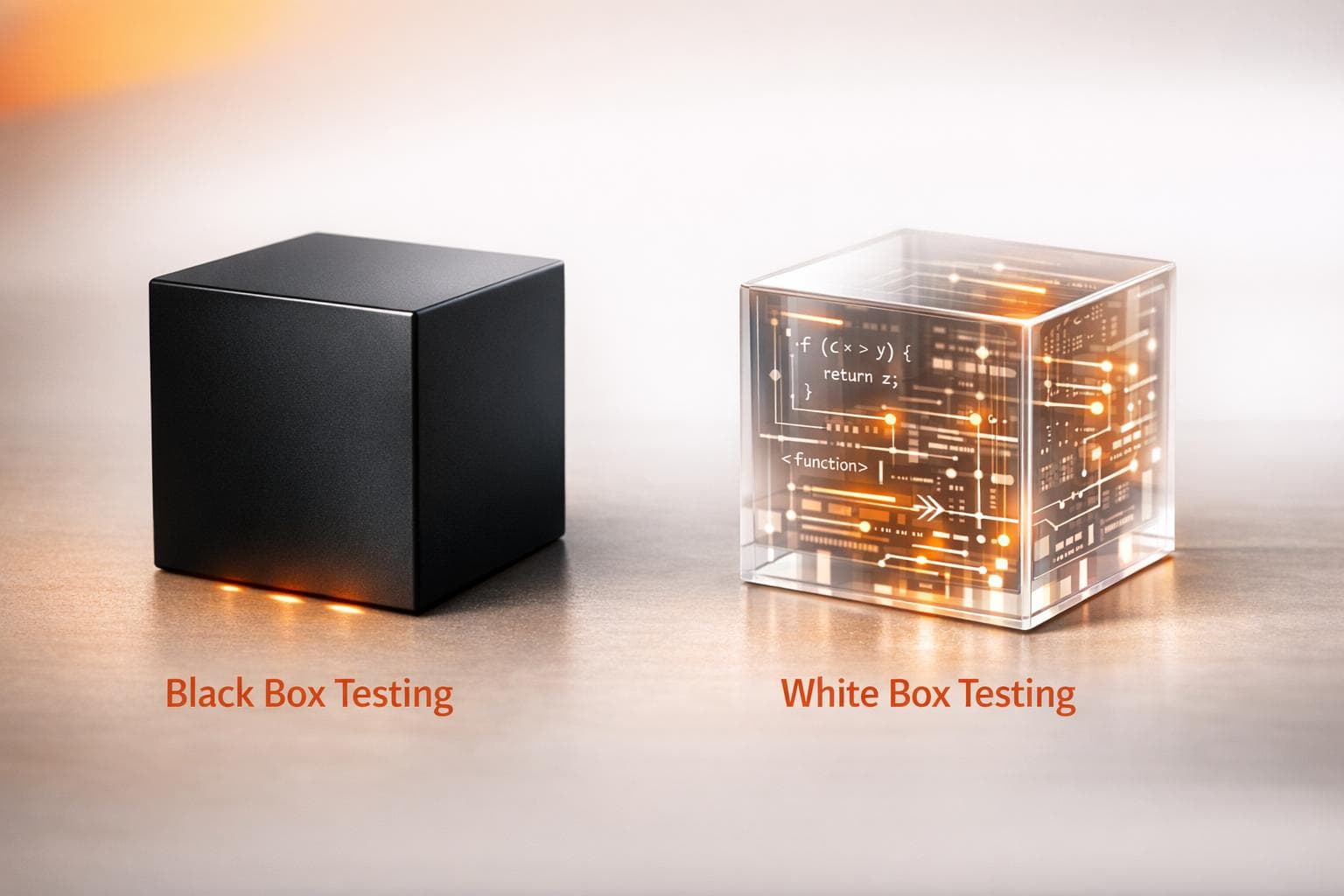
When it comes to software testing, Black Box Testing and White Box Testing serve two distinct purposes. Black Box Testing evaluates the software's functionality from the user's perspective, focusing on inputs and outputs without examining the internal code. White Box Testing, on the other hand, examines the internal structure of the code to ensure logic, security, and efficiency.
Key Takeaways:
- Black Box Testing: Focuses on functionality, user requirements, and external behavior. No coding knowledge is needed.
- White Box Testing: Focuses on internal code logic, structure, and execution paths. Requires programming expertise.
Quick Overview:
- Black Box Testing is ideal for System Testing, Integration Testing, and User Acceptance Testing.
- White Box Testing works best for Unit Testing, Integration Testing, and Security Testing.
- Both methods together ensure a well-rounded approach to software quality.
Quick Comparison:
| Aspect | Black Box Testing | White Box Testing |
|---|---|---|
| Knowledge Needed | No coding knowledge required | Requires programming expertise |
| Focus | External behavior and user requirements | Internal logic, code structure, and security |
| Techniques | Equivalence Partitioning, Boundary Analysis | Statement, Branch, Path Coverage |
| Use Cases | System, Acceptance, Regression Testing | Unit, Integration, Security Testing |
| Execution Time | Faster | More time-intensive |
Both methods are essential for ensuring software quality. Black Box Testing ensures user satisfaction, while White Box Testing guarantees internal reliability. Together, they provide a balanced testing strategy.
Black Box vs White Box Testing: Complete Comparison Guide
Software Testing Tutorial #20 - Black Box Testing vs White Box Testing
sbb-itb-eb865bc
What is Black Box Testing?
Black Box Testing, sometimes called behavioral or closed box testing, is all about evaluating software functionality based on its requirements and specifications. Imagine testing a vending machine: you insert money, press a button, and expect the correct snack to drop. You don’t need to know how the machine works internally to confirm it’s functioning as it should. This testing method focuses entirely on the software’s external behavior to ensure it meets expectations.
In practice, testers provide inputs and verify if the outputs align with the documented requirements, helping to identify any issues in the software’s behavior. As Vladimir Sokurenko, CEO of White Test Lab, explains:
"The methodology of black box testing is to estimate the application's external behavior. The procedure is to make an input and receive an output without looking at the internal processes".
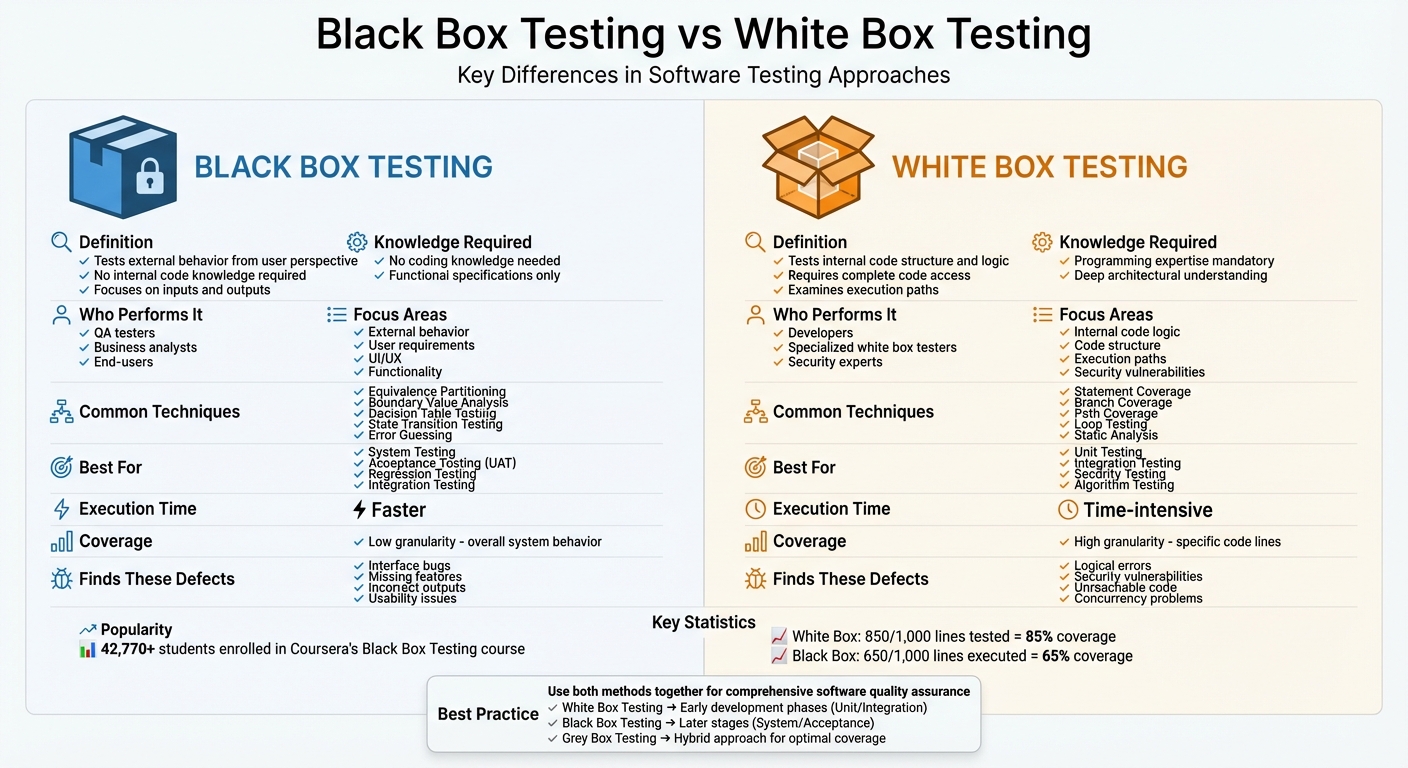
One of the biggest advantages of this approach is its accessibility. Since it doesn’t require programming skills or access to the source code, a wide range of people - QA testers, business analysts, or even end-users - can perform it. This independence reduces bias in the testing process. To illustrate its popularity, the Foundations of Software Testing and Validation course on Coursera, which covers black box testing techniques, has drawn over 42,770 students.
Now, let’s dive into the core features that define black box testing.
Key Characteristics of Black Box Testing
The main idea behind Black Box Testing is simple: check inputs and outputs without worrying about how the system works internally. It’s all about validating the software from the perspective of the end user. Testers rely on functional specifications to design their test cases, ensuring the software behaves as documented. As Elena Leralta, CFO of Foreworth, puts it:
"Black box testing typically ensures that applications under development do what they're supposed to. [It] focuses primarily on the inputs and outputs and isn't concerned with how the results or outputs are achieved".
One of the perks of this method is that testing can begin early, as soon as the software has minimal functionality. This allows teams to catch errors sooner rather than later. Test coverage is often measurable too - for instance, if 650 out of 1,000 lines of code are executed during testing, the coverage would be 65%.
Common Techniques in Black Box Testing
There are several techniques used to make Black Box Testing more effective:
- Equivalence Partitioning: This method groups input data into categories that should behave similarly, reducing the number of test cases needed. For example, when testing an age field that accepts values between 18 and 65, you might test one valid value (like 30) and two invalid ones (e.g., 10 and 70).
- Boundary Value Analysis: This technique targets the edges of input ranges, where errors are most likely. For instance, if a password must be between 8 and 20 characters, you’d test inputs like 7, 8, 19, and 20 characters.
- Decision Table Testing: This approach uses a table to map out complex business rules and their expected outcomes based on various input combinations.
- State Transition Testing: This evaluates how a system behaves when transitioning between different states, such as after multiple failed login attempts.
- Error Guessing: Experienced testers use their intuition to predict areas where defects are likely to occur.
Typical Use Cases for Black Box Testing
Black Box Testing is particularly effective at higher levels of the testing pyramid, including System Testing, Integration Testing, and User Acceptance Testing (UAT). Here’s how it fits into each:
- System Testing: The entire application is tested as a complete unit to ensure all components work together to meet business requirements.
- Integration Testing: This focuses on verifying that different modules or services interact correctly when integrated.
- User Acceptance Testing (UAT): This is the final check before release, where end-users or stakeholders ensure the software meets their needs.
Beyond these, Black Box Testing is also valuable for identifying usability issues, reliability concerns, response time delays, and interface-level bugs. It’s often used for non-functional and regression testing to confirm performance, scalability, and compatibility across different platforms.
What is White Box Testing?
White Box Testing - sometimes referred to as glass box, clear box, or structural testing - takes a deep dive into the inner workings of software. Unlike Black Box Testing, which treats the software as a sealed unit and focuses on its outputs, White Box Testing opens up the codebase and examines its internal structure, logic, and execution paths. Imagine a mechanic who doesn’t just test-drive a car but lifts the hood to inspect the engine, wiring, and components to ensure everything runs smoothly beneath the surface.
This approach is all about verifying the internal logic and execution paths to make sure every branch of the code is tested. While Black Box Testing focuses on functionality from the user’s perspective, White Box Testing evaluates the software’s internal mechanics. This requires technical expertise - testers need to understand programming languages, software design, and architecture. Typically performed by developers or specially trained testers, White Box Testing provides detailed insights into the software’s efficiency, security, and logical soundness. As Guru99 puts it, "The main objective of White Box testing is done to check the quality of the code".
Key Characteristics of White Box Testing
White Box Testing requires complete access to the source code and internal documentation. Testers dig into design documents, architectural diagrams, and code comments to understand how data flows through the system and how various components interact. This level of access allows them to analyze control structures - such as loops, if-else statements, and switch cases - to ensure the code behaves as intended.
Testers also track variable usage to catch uninitialized variables or potential data leaks. Additionally, they identify and eliminate redundant or inefficient code that doesn’t contribute to the software’s functionality. As BrowserStack explains:
"White box testing involves looking inside the application and understanding its code, logic, and structure".
While this method is thorough, it’s also time-intensive. Analyzing every possible execution path takes significant effort, but the resulting insights help prevent bugs from slipping into production.
Common Techniques in White Box Testing
White Box Testing employs several techniques to systematically evaluate code quality:
- Statement Coverage: Ensures every line of code is executed at least once. For example, if 850 out of 1,000 lines are tested, you achieve 85% coverage.
- Branch Coverage: Tests all possible outcomes of decision points. For every if-else condition or switch statement, both the true and false paths are verified.
- Path Coverage: Examines every potential logical route through the program. While this is comprehensive, it can become complex as the codebase grows.
Other techniques include Loop Testing, which checks the behavior of loops (initialization, iteration, and termination), and Static Analysis, which reviews the code without executing it to uncover syntax errors and potential security issues.
Typical Use Cases for White Box Testing
White Box Testing is particularly effective for unit and integration testing. In Unit Testing, individual functions or components are tested in isolation to ensure they perform correctly. Integration Testing, on the other hand, focuses on how modules interact and communicate with one another.
It’s also a powerful tool for Security Testing, as it allows testers to identify vulnerabilities like hardcoded credentials, insecure code patterns, or data leaks by directly examining the code. Additionally, White Box Testing is ideal for Algorithm Testing, where the accuracy and efficiency of complex logical or mathematical processes are scrutinized.
Modern development teams often integrate automated White Box Testing into CI/CD pipelines. By running these tests with every code change, they can catch defects early, preventing them from escalating to later stages of development. This proactive approach not only saves time but also reduces costs in the long run.
Black Box Testing vs White Box Testing: Key Differences
Black Box Testing and White Box Testing are two distinct approaches in software testing, each offering unique advantages based on their focus and methodology. While Black Box Testing evaluates software from an external user perspective, White Box Testing dives deep into the internal workings of the code. As Guru99 aptly describes:
"Black box testing is a high level of testing that focuses on the behavior of the software. It involves testing from an external or end-user perspective".
This fundamental difference influences everything from who conducts the tests to when they fit into the development cycle.
Black Box Testing is accessible to testers without programming expertise and can begin early, as soon as the requirements are defined. In contrast, White Box Testing demands a solid understanding of programming and starts only when the code is available. Anastazija Spasojevic from PhoenixNAP provides further insight:
"White box testing is intricate and time-consuming since testers inspect every aspect of the software's internal workings by scrutinizing source code and design documentation".
These differences shape the timing, focus, and depth of testing efforts.
The types of defects uncovered by each method also vary. Black Box Testing is effective at identifying interface bugs, missing features, incorrect outputs, and usability issues. On the other hand, White Box Testing is excellent for detecting logical errors, security vulnerabilities, unreachable code, and concurrency problems. Essentially, Black Box Testing addresses functional issues, while White Box Testing targets structural flaws. Together, they provide a comprehensive approach to ensuring software quality.
Here’s a side-by-side comparison of key differences:
Comparison Table
| Dimension | Black Box Testing | White Box Testing |
|---|---|---|
| Tester Knowledge | No knowledge of internal code or structure needed | Requires deep knowledge of programming and architecture |
| Focus Areas | External behavior, functionality, UI/UX, user requirements | Internal code logic, structure, execution paths, security |
| Common Techniques | Equivalence Partitioning, Boundary Value Analysis, Error Guessing | Statement Coverage, Branch Coverage, Path Coverage, Loop Testing |
| Test Levels | System Testing, Acceptance Testing, Regression Testing | Unit Testing, Integration Testing, Static Code Analysis |
| Execution Time | Faster to design and execute | Time-intensive due to code complexity |
| Automation Compatibility | Ideal for end-to-end and regression automation; may face challenges with frequent UI changes | Highly suitable for automating unit and integration tests |
| Performed By | QA testers, end-users, business analysts | Developers, specialized white box testers |
| Algorithm Testing | Not ideal for complex algorithms | Preferred for testing complex algorithms |
| Granularity | Low - focuses on overall system behavior | High - pinpoints specific lines of code |
Both approaches are integral to a well-rounded testing strategy, addressing different aspects of software quality to ensure a robust and reliable product.
Advantages and Disadvantages
When it comes to creating a solid testing strategy, weighing the strengths and weaknesses of both Black Box and White Box Testing is essential. Each approach offers unique benefits and challenges, depending on the goals and scope of your testing efforts.
Black Box Testing is excellent for validating user requirements and evaluating how software behaves from an external perspective. One of its standout advantages is the ability to design test cases early in the development process. As soon as the requirement specifications are finalized, teams can start preparing, which helps speed up testing timelines. This makes it especially useful for large-scale systems and high-level testing phases like System and Acceptance Testing.
That said, Black Box Testing has its limitations. It doesn’t dive into the internal workings of the code, meaning hidden logic errors or untested code paths can slip through. Test reports often lack detailed explanations of what caused a failure internally. Plus, redundancy can be an issue - testers might unknowingly duplicate efforts already covered by developers or repeatedly test the same functional areas. If the initial requirements are unclear or incomplete, the test cases themselves can lose effectiveness.
On the flip side, White Box Testing takes a deeper dive, focusing on the internal details of the code. It offers comprehensive code coverage by examining every statement, branch, and execution path. As Ranorex aptly puts it:
"White box testing is more 'surgical,' meaning it provides more specific data."
This precision helps developers identify inefficiencies, such as redundant code, which can then be removed to enhance system performance. It’s also a powerful tool for finding internal security vulnerabilities that external testing methods might overlook.
However, White Box Testing isn’t without its challenges. It demands significant resources, including highly skilled testers with advanced programming knowledge. Mapping out all possible execution paths can be both time-intensive and complex. As TechTarget highlights:
"White box testing, on its own, cannot identify problems caused by mismatches between the actual requirements or specification and the code as implemented."
Another drawback is maintenance. Automated White Box tests can quickly become outdated when there are frequent changes to the codebase, requiring constant updates to remain effective.
Comparison Table of Pros and Cons
| Aspect | Black Box Testing | White Box Testing |
|---|---|---|
| Primary Benefit | Validates user requirements and external behavior | Ensures code efficiency, security, and structure |
| Accessibility | Accessible to non-programmers | Requires expert programming skills |
| Time Investment | Faster to design and execute | Time-intensive due to detailed code analysis |
| Coverage Depth | Limited to external behavior | Thoroughly analyzes every code statement |
| Early Detection | Allows test design before coding begins | Detects bugs early in unit and integration phases |
| Code Optimization | Not applicable | Identifies and removes redundant code |
| Security Testing | Misses internal vulnerabilities | Uncovers hidden security flaws |
| User Perspective | Focuses on usability and end-user experience | May overlook usability and user experience issues |
| Maintenance | Requires updates with UI changes | Tests can become outdated with code refactoring |
| Primary Drawback | Leaves internal code errors undetected | High cost and specialized skill requirement |
When to Use Black Box Testing vs White Box Testing
Choosing the right testing method depends on factors like the development stage, team expertise, and the risks involved. Typically, White Box Testing is most effective in the early phases, such as unit and integration testing. During these stages, developers focus on validating individual components and how modules interact. On the other hand, Black Box Testing is better suited for later stages, like system and acceptance testing, where the goal is to confirm the software meets business requirements and functions as intended.
For applications where security is a top priority, White Box Testing - especially through static analysis - can uncover vulnerabilities hidden within the code. Regulatory standards like ISO 27001 and PCI DSS often require both internal code reviews and external penetration testing. Aligning testing methods with the development process ensures risks are managed effectively, while resources are used wisely.
Black Box Testing: Best Use Cases
Black Box Testing shines when it comes to validating user-facing features. It’s particularly useful during system and acceptance testing, as it ensures the software meets functional specifications and mimics real-world user interactions through the interface.
This approach is ideal if your team doesn’t have access to the source code or lacks coding expertise. It’s also the go-to method for large-scale applications with many user-facing features or for testing non-functional aspects like load performance, stress tolerance, and compatibility across different platforms.
White Box Testing: Best Use Cases
White Box Testing focuses on verifying the internal workings of the software, such as logic, code quality, and security. It’s most effective during unit and integration testing, where catching bugs early can save time and effort. For example, it’s invaluable for testing algorithms, especially those involving complex mathematical or data-processing tasks.
Security-critical applications greatly benefit from White Box Testing. Techniques like static application security testing (SAST) allow for a detailed examination of code pathways, helping identify vulnerabilities that external testing might overlook. This method also plays a key role in optimizing code performance by spotting unreachable code, removing redundancies, and eliminating unnecessary instructions. It’s particularly useful in high-risk areas like payment processing or data encryption, where precision and reliability are crucial.
Combining Both Approaches
Using both Black Box and White Box Testing together can fill gaps in coverage and improve overall software quality. This hybrid method, often referred to as Grey Box Testing, combines limited internal knowledge (like architecture diagrams) with external behavior validation.
This mixed approach is especially useful at integration points where different modules interact. For instance, in API testing, it ensures both the request/response structures and the underlying data handling logic are sound. Security penetration testing also benefits from this blend, as internal insights can guide realistic external attack simulations.
A practical strategy might involve starting with White Box Testing during the coding phase, using automated unit tests and static code analysis to catch logic errors early. Then, as the software moves closer to release, Black Box Testing ensures it meets business requirements and delivers a smooth user experience. For a balanced approach, consider applying White Box Testing to high-risk areas, like encryption or payment processing, and Black Box Testing to standard user-facing features. If your project needs to meet standards like SOC 2 or HIPAA, documenting both internal code reviews and external functional tests is a must.
Conclusion
Black Box Testing and White Box Testing aren't rivals - they're two sides of the same coin, working together to create a thorough quality assurance (QA) strategy. Black Box testing focuses on what the software does from the user's perspective, ensuring it meets business goals and provides a seamless experience. On the other hand, White Box testing digs into how the software operates internally, exposing hidden errors and vulnerabilities. Together, they create a well-rounded testing approach.
"White Box Testing and Black Box Testing serve different purposes, but both are essential for ensuring that software works as expected." - GeeksforGeeks
Here's the takeaway: White Box testing shines during the early development phases, like unit and integration testing, helping developers catch bugs before they escalate. Meanwhile, Black Box testing plays a critical role during system and acceptance testing, ensuring the final product satisfies user needs. For applications where security is paramount, White Box testing can pinpoint internal weaknesses through static analysis, while Black Box testing assesses the system's behavior from an external viewpoint.
Recognizing the strengths of both methods, many teams now embrace Grey Box Testing - a hybrid approach that blends partial knowledge of the internal workings with external testing. This method is particularly useful for testing interactions at integration points, where different modules come together.
"Together, these two forms of testing ensure user satisfaction and an impeccable reputation for the company that releases the software." - PhoenixNAP
FAQs
What are the benefits of using both Black Box and White Box Testing together?
Combining Black Box Testing and White Box Testing offers a well-rounded strategy for ensuring software quality. Black Box Testing examines the system from the user's perspective, focusing on how well it performs, its usability, and its reliability - without diving into the actual code. On the flip side, White Box Testing digs into the internal workings, analyzing code logic, paths, and security flaws. Using both approaches together helps catch defects that might slip through if only one method is used.
This dual approach also boosts efficiency and risk management. White Box Testing is usually done early in the development cycle to spot low-level bugs and security gaps. Meanwhile, Black Box Testing comes later, simulating real-world conditions to validate the system's overall performance. By tackling both the internal and external aspects of the software, teams can cut down on rework, save money, and deliver a product that’s both secure and reliable.
How does White Box Testing improve software security?
White Box Testing plays a key role in strengthening software security by giving testers access to the application's internal code, architecture, and logic. This method helps expose vulnerabilities that might otherwise go unnoticed, such as insecure coding practices, weak authentication setups, poor error handling, and flawed encryption techniques.
By diving into the source code and analyzing control and data flows, developers can spot and resolve security issues early in the development cycle. This proactive approach ensures that critical security features are implemented correctly, minimizes the chances of exploitable flaws making it to production, and aligns with a secure-by-design philosophy for building software.
When should you use Black Box Testing during software development?
Black Box Testing shines when you need to assess a system from the perspective of an end user, without diving into its underlying code. This makes it especially effective during the later stages of development - like system testing, user acceptance testing (UAT), or beta releases - as it helps verify functional requirements, usability, and performance.
This method works particularly well for functional and regression testing, as it's based on specifications or user stories. Since the focus is entirely on how the system behaves externally, testers don’t need programming skills. Instead, they can zero in on the overall functionality and user experience. Black Box Testing is a great way to confirm that the application meets user expectations and performs as intended, particularly during integration, system, and acceptance testing phases.