Test Automation FAQ: 15 Common Questions Answered
Answers 15 common test automation questions: what to automate first, balancing manual vs automated testing, AI self-healing, tool selection, CI/CD and ROI.
Test Automation FAQ: 15 Common Questions Answered
Test automation saves time, reduces errors, and improves testing efficiency. This guide answers 15 frequently asked questions, covering key topics like:
- What to automate first: Start with regression, smoke tests, and business-critical workflows.
- Balancing manual vs. automated testing: Use automation for repetitive tasks; keep manual testing for exploratory scenarios.
- AI in automation: Tools like Rock Smith reduce maintenance by up to 90% with intent-based testing and visual intelligence.
- Choosing tools: Align tools with team skills and CI/CD pipelines.
- Reducing flaky tests: Use smarter locators, parallel execution, and condition-based waits.
Where Should I Start For Automation Testing? | Automation Testing Tutorial for Beginners | Day 8
Test Automation Basics
Manual vs Automated Testing: When to Use Each Approach
Automated vs. Manual Testing
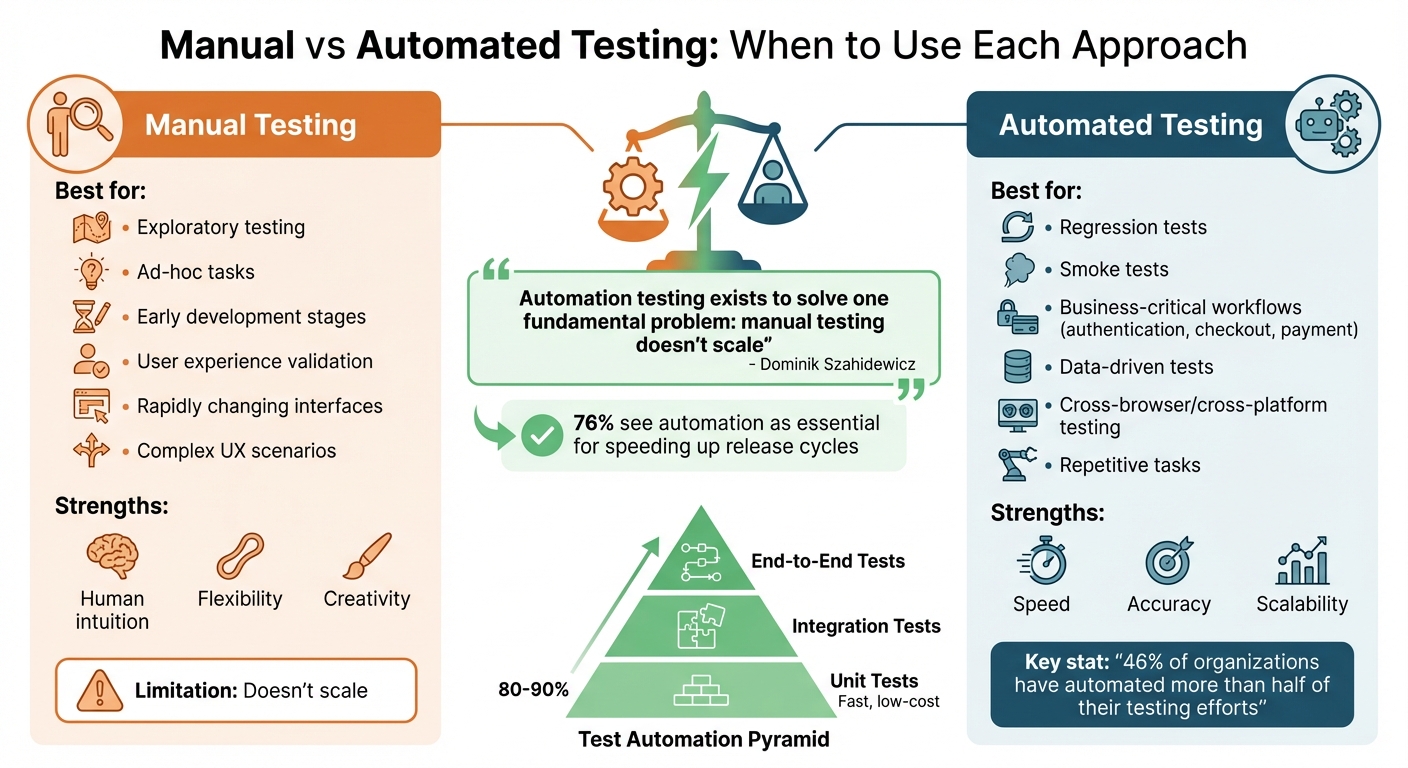
Manual testing relies on human intuition to evaluate software behavior and usability. It shines in areas like exploratory and ad-hoc tasks, where flexibility and creativity are essential. On the other hand, automation uses tools to run repetitive tests with speed and accuracy, making it a practical solution for scaling testing efforts. However, manual testing struggles to match the scalability that automation offers.
A balanced approach often works best. Manual testing is particularly useful in the early stages of development when features are still evolving, and user experience needs careful attention. Once critical workflows - like authentication or checkout - are stable, automation becomes a powerful tool for handling repetitive regression tests efficiently. Dominik Szahidewicz, Technical Writer at BugBug, captures this sentiment well:
"Automation testing exists to solve one fundamental problem: manual testing doesn't scale".
The next step is to identify which tests benefit most from automation.
Which Tests to Automate First
Start with regression and smoke tests. These are run frequently to confirm core functionality and provide immediate returns on investment. Afterward, focus on automating business-critical workflows that directly impact revenue or user trust, such as authentication, checkout, payment processing, and key API endpoints. Think of these as the "main streets" of your application that require constant monitoring.
Data-driven tests are another strong candidate for automation. For example, validating forms with multiple input scenarios or testing database operations can be handled consistently and efficiently through automation, eliminating the risk of human error. Similarly, cross-browser and cross-platform testing is essential - manually verifying behavior across a variety of browsers and devices is time-consuming and impractical. Martin Schneider, Delivery Manager, highlights the impact of automation:
"Before BrowserStack, it took eight test engineers a whole day to test. Now it takes an hour. We can release daily if we wanted to."
However, not every test is a good fit for automation. Avoid automating UI elements that are still under active development or edge cases that are better handled manually. Instead, focus on deterministic tests with clear pass/fail criteria and stable interfaces for the best return on investment.
How AI Changes Test Automation
AI takes test automation to the next level by making it smarter and more adaptive. Traditional automation can be fragile - minor UI changes often break tests. AI-powered platforms like Rock Smith address this by interpreting the intent behind test steps, such as "Click the login button", using visual intelligence. This allows tests to adapt to UI changes, reducing maintenance efforts by up to 90%.
AI also enhances visual intelligence, going beyond basic element checks. It can spot typos, detect color inconsistencies, identify layout issues, and even verify that a price chart accurately reflects underlying data. Teams that use AI-driven self-healing report a 50–70% reduction in maintenance time. Jason Arbon, Founder of Test.ai, explains the value of AI in testing:
"AI in test automation isn't about replacing human testers - it's about augmenting their capabilities and freeing them to focus on more creative and complex testing challenges".
Planning Your Test Automation Strategy
How to Balance Manual and Automated Testing
The test automation pyramid provides a practical way to divide your testing workload. Picture a pyramid with three layers: a solid base of fast, low-cost unit tests covering 80% to 90% of your code, a middle layer for integration tests, and a narrow top layer for end-to-end tests. This setup emphasizes speed and reliability while keeping maintenance manageable.
Trying to automate every single test is neither practical nor efficient. Instead, focus on automating tasks based on how often they’re needed, their complexity, and their overall importance to your business. Repetitive tasks like logins, data entry, regression testing, and cross-browser checks are great candidates for automation. On the other hand, manual testing is better suited for exploratory testing, complex user experience validation, and applications with rapidly changing interfaces. A recent survey shows that 46% of organizations have automated more than half of their testing efforts, and 76% see automation as essential for speeding up release cycles.
When designing automated tests, aim for simplicity. Each test should validate a single, clear user journey - like "User can log in and view their profile" - rather than trying to cram too much into one test. Use APIs or database calls to set up test data instead of relying on slower UI-based steps. If a test becomes flaky, address it immediately by isolating it from your main pipeline until it’s fixed.
With your strategy in place, the next priority is choosing the right tool for your needs.
Selecting a Test Automation Tool
Once you’ve outlined your testing strategy, the next step is finding the right tool. The ideal tool should align with your team’s technical skills. Options range from coding-heavy frameworks that require languages like Java, JavaScript, or C# to no-code platforms that enable product managers and manual testers to participate in the process. Tools with AI-powered self-healing features are particularly useful for scaling. These tools use intelligent selectors to adapt to changes in UI elements, reducing the need for constant maintenance.
Make sure the tool supports your specific testing environment. This includes access to real devices and browsers, not just emulators, and seamless integration with your CI/CD pipeline tools like Jenkins, GitHub Actions, or CircleCI. For U.S.-based teams, it’s also essential to ensure compliance with security standards like SOC2 Type 2 and GDPR. A tool like Rock Smith meets these requirements while offering AI-driven features that cut down on false positives through clear, visual workflows.
Before fully committing, run a proof of concept. Automate a small set of critical test cases and verify how well the tool integrates with your existing pipeline.
How to Maintain Test Suites
After choosing your tool and strategy, maintaining your test suite becomes the key to long-term success. Start with solid test design. Keep tests short and focused - tests with more than 50 steps are much harder to debug. Ensure each test runs independently, with its own data and session state, so one failure doesn’t disrupt others. Reuse common sequences, like login or navigation, by encapsulating them into components that can be updated in one place.
Avoid using brittle locators tied to implementation details like CSS classes or XPath. Instead, rely on user-facing attributes or AI-powered smart selectors that recognize elements based on their visual context. Replace static "sleep" commands with smarter, condition-based waits that handle asynchronous operations more effectively.
For teams with non-technical members, tools like Rock Smith simplify maintenance with plain-English flows. These allow anyone to write and update tests using natural language commands, reducing technical debt and saving time. Consider this: a team running 1,000 tests daily with a 10% flakiness rate could spend up to 50 hours every day investigating failures. A well-maintained suite can drastically cut down that time.
sbb-itb-eb865bc
Running and Scaling Test Automation
Adding Automation to CI/CD Pipelines
Incorporating automated tests into your CI/CD pipeline makes testing more efficient and reliable. Break your pipeline into distinct phases: Build (compiling and packaging code), Test (running various layers of test suites), Quality Checks (linting and performing security scans), and Deploy (pushing updates to staging or production). Automate builds to trigger on pull requests, commits, or merges to critical branches, ensuring every code change is validated.
Adopt the test pyramid strategy by prioritizing fast unit and API tests first - these should wrap up in minutes and catch most issues early. Save slower end-to-end UI tests for later stages or run them in parallel on cloud infrastructure to save time. Use quality gates to block merges when critical tests fail or unit test coverage falls below acceptable levels. This ensures broken code doesn’t make it to production and keeps quality at the forefront.
Our platform integrates seamlessly with Jenkins, GitHub Actions, and CircleCI for real-time execution and monitoring. With AI-powered capabilities, it minimizes false positives, so alerts are raised only for actual issues.
Once your pipeline is running smoothly, it’s time to measure how these changes are paying off.
How to Measure ROI and Success
Reduced maintenance is just one part of the ROI equation. The standard ROI formula is: ((Benefits - Costs) / Costs) x 100. Benefits include savings from fewer manual testing hours, quicker feedback loops, and earlier bug detection. Costs typically cover tool licenses, infrastructure, and ongoing maintenance. For U.S.-based teams, using an average QA engineer rate of $75/hour can help calculate these savings.
Quality assurance and testing account for about 23% of a company’s annual IT budget. While initial ROI might hover around 57.5% due to setup costs, it can climb to 186% or higher once the upfront expenses are recovered. Catching bugs early is key - fixing a production bug can cost 30 to 100 times more than resolving it during the requirements or design phase.
Track success using metrics across four key categories:
| Metric Category | Key Success Indicators |
|---|---|
| Velocity | Test execution time, release frequency, time to resolution |
| Quality | Defect detection rate, defect leakage to production, test pass rate |
| Efficiency | Engineering hours saved, automation coverage percentage, maintenance overhead |
| Financial | Cost per test run, infrastructure savings, total ROI percentage |
Keep a close eye on maintenance efforts. If your team spends more than 15-40% of their time maintaining tests, it’s worth revisiting and cleaning up outdated or unnecessary tests.
Reducing Test Costs and Flakiness
Measuring ROI is only part of the equation - reducing flaky tests is just as important for cutting costs. Flaky tests undermine confidence and waste both time and resources. Research shows that each flaky test incident comes with an average investigation cost of $5.67.
Parallel execution is a game-changer for speeding up test runs. Leveraging cloud infrastructure to run tests across multiple environments and browsers simultaneously can drastically reduce overall testing time. Use test impact analysis to focus only on tests affected by specific code changes, avoiding the need to run the entire suite with every commit. Externalizing test data (e.g., storing it in JSON files or databases) prevents resource conflicts, while Docker containers ensure consistent test environments across developer machines, CI agents, and cloud platforms, eliminating those frustrating "works on my machine" problems.
Companies implementing these strategies have reported up to 60% faster defect detection and 50% lower bug fix costs.
Using AI-Powered Test Automation
What AI Brings to Test Automation
AI has reshaped test automation by introducing self-healing capabilities. Instead of relying on static selectors, AI identifies UI elements based on intent. This means that even if the UI changes, tests can continue running without interruptions.
With AI, you can describe actions in simple, natural language - like saying, "click the login button." This makes tests more adaptable to UI changes and significantly reduces maintenance time. In fact, AI-powered platforms can cut maintenance efforts by up to 90%.
Visual AI takes testing a step further by detecting layout shifts, color mismatches, and even typos - issues that traditional assertions might miss. This approach not only reduces review time but also minimizes flaky test results by as much as 78%. For example, in October 2025, Peloton adopted Visual AI and reduced their test maintenance workload by 78%, addressing visual discrepancies that functional scripts had overlooked.
AI also excels at generating smart data for testing. It creates realistic edge cases that static data might miss, ensuring more thorough coverage. And when something fails, AI doesn’t just throw a stack trace at you - it explains the failure, helping you distinguish between real bugs and environmental factors like network issues.
"AI in testing isn't about replacing people - it's about enabling them to do more with less".
Beyond improving accuracy and efficiency, these AI-driven tools also align with the strict security and compliance standards that U.S. teams must follow.
Security and Compliance for U.S. Teams
For U.S. teams, data protection and auditability are non-negotiable. AI-powered platforms address these needs by keeping sensitive information local. Placeholder syntax (e.g., {{password}}) ensures that credentials are swapped in at runtime rather than being sent to external AI models. Rock Smith, for example, marks sensitive data as "Hidden" to keep it out of UI logs and reports.
Organizations with heightened security needs can opt for on-premise deployment, ensuring all data stays within their internal networks. Instead of storing credentials internally, these platforms integrate with external vaults like HashiCorp Vault to retrieve secrets securely at runtime. This approach aligns with Executive Order 14110, which emphasizes building AI systems that are safe, secure, and resilient.
To further fortify security, AI red teaming is a proactive strategy. According to CISA:
"a structured testing effort to find flaws and vulnerabilities in an AI system, often in a controlled environment and in collaboration with developers".
Regular adversarial testing helps uncover hidden vulnerabilities and ensures compliance with U.S. security standards. CISA also stresses the importance of balancing speed with security, noting:
"the development and implementation of AI software must break the cycle of speed at the expense of security".
Audit trails are another critical component. AI-powered alerting systems filter out environmental noise and focus on significant security failures, providing clear documentation for compliance audits. For teams managing critical infrastructure, aligning workflows with the CISA Roadmap for Artificial Intelligence helps mitigate risks effectively.
Rock Smith Pricing and Plans
Rock Smith combines AI-driven efficiency with flexible pricing to accommodate a range of testing needs.
- Pay-As-You-Go: Priced at $0.10 per credit (minimum 50 credits, valid for one year). Ideal for occasional testing or evaluations.
- Growth: Offers 550 credits per month at a fixed monthly rate. Additional credits are billed at $0.09 each. This plan is designed for teams scaling their automation efforts while maintaining predictable costs. Features include AI-powered test flows, semantic targeting, visual intelligence, automated discovery, and 12 assertion types.
- Professional: Includes 2,000 credits per month, with overage credits billed at $0.06 each - 40% cheaper than the Pay-As-You-Go option. This plan supports real-time execution and secure testing for internal and staging apps, meeting U.S. data protection standards.
Credits are used based on the complexity of tests. Simple smoke tests consume fewer credits, while comprehensive end-to-end scenarios with multiple assertions and edge cases require more. Teams can track and manage their credit usage through the platform dashboard, helping them optimize their testing strategy and avoid unexpected costs.
Conclusion
Test automation doesn’t have to come with endless maintenance headaches. By shifting to AI-powered testing, teams can tackle the biggest challenges of traditional automation, cutting maintenance efforts by as much as 90%.
Rock Smith takes on these challenges with tools like self-healing capabilities, intent-based testing, and visual intelligence. These features adapt to changes automatically, slashing testing costs to just $500–$3,000 per month - far less than the traditional $200,000+ annual price tag.
The platform also prioritizes data security, ensuring sensitive information stays protected and compliance requirements are met.
Today, 81% of development teams use AI in testing, with those adopting AI reporting a staggering 93% reduction in testing costs. Whether you’re starting small with the Pay-As-You-Go plan at $0.10 per credit or scaling up with the Professional tier, which offers 2,000 monthly credits, Rock Smith’s pricing adjusts to fit your needs.
AI-powered testing doesn’t just save time and money - it transforms the entire QA process. Start by focusing on critical user journeys, integrate seamlessly with your CI/CD pipeline, and let AI handle repetitive tasks. This approach delivers faster feedback, better test coverage, and frees your team to concentrate on building features instead of maintaining tests. With AI-powered testing, you can speed up development, enhance quality, and give your team the freedom to focus on innovation.
FAQs
How does AI improve the efficiency of test automation?
AI has revolutionized test automation by introducing self-healing tests, which adapt to changes in the user interface without requiring constant manual updates. This means less time spent fixing broken tests and more time focusing on what really matters. Additionally, AI-driven assertions can automatically generate test data and improve coverage, streamlining the entire testing process.
By leveraging AI, teams can cut maintenance efforts by as much as 90% and dramatically speed up test creation and execution. This not only shortens development cycles but also ensures more reliable test coverage with minimal manual effort.
What should I consider when selecting a test automation tool?
When choosing a test automation tool, it's important to consider how well it aligns with your project requirements. Look for tools that support the type of testing you need - whether that's web, mobile, or desktop - and ensure they work with your preferred programming languages and operating systems. Integration with your CI/CD pipelines is another critical factor, along with features like simple maintenance, scalability, and detailed reporting.
You’ll also want to evaluate the cost and licensing model, how user-friendly the tool is for your team, and whether reliable vendor or community support is available to resolve issues quickly. The right tool can simplify your testing workflow and boost overall productivity.
How do you integrate test automation into a CI/CD pipeline effectively?
To successfully incorporate test automation into your CI/CD pipeline, start by managing your automated tests like first-class code. This means storing them in the same version-controlled repository as your application. Then, configure your CI/CD system to automatically run these tests whenever code changes are pushed or pull requests are made. This setup ensures that unit, API, and UI tests are executed in a clean, isolated environment before moving forward in the build process.
For efficient workflows, choose tools that integrate smoothly with your CI/CD platform and support parallel test execution to keep runtimes short. Build modular, reusable test scripts and ensure they produce standardized reports to simplify debugging. Adopting a "shift-left" strategy - embedding testing earlier in the pipeline - allows you to identify issues sooner. Automation can also enforce a "fail fast" approach, stopping defective code from advancing to later stages.
With this system in place, every code change prompts consistent testing, enabling you to catch bugs early, speed up releases, and enhance software quality overall.