Selenium vs AI-Powered Testing: Which Is Better?
Compare Selenium and AI-powered testing: pros, setup time, maintenance, costs, and when to use each or a hybrid approach for more efficient QA.

Selenium vs AI-Powered Testing: Which Is Better?
Which testing approach is better: Selenium or AI-powered tools? Here's the short answer: Selenium is ideal for teams with strong coding skills working on stable projects, while AI-powered testing is better for fast-changing environments with frequent UI updates. Each has its strengths and limitations, and in some cases, combining both can deliver the best results.
Key Insights:
- Selenium is free, supports multiple programming languages, and excels in cross-browser testing. However, it requires significant coding expertise and is prone to breaking with UI changes, leading to high maintenance needs.
- AI-powered testing uses self-healing locators, natural language processing, and visual intelligence to simplify test creation and reduce maintenance by up to 95%, but it often comes with higher upfront costs and vendor lock-in.
- Comparison: Selenium is better for projects with stable UIs and skilled technical teams, while AI-powered tools are faster and more efficient for dynamic, fast-moving projects.
Quick Comparison:
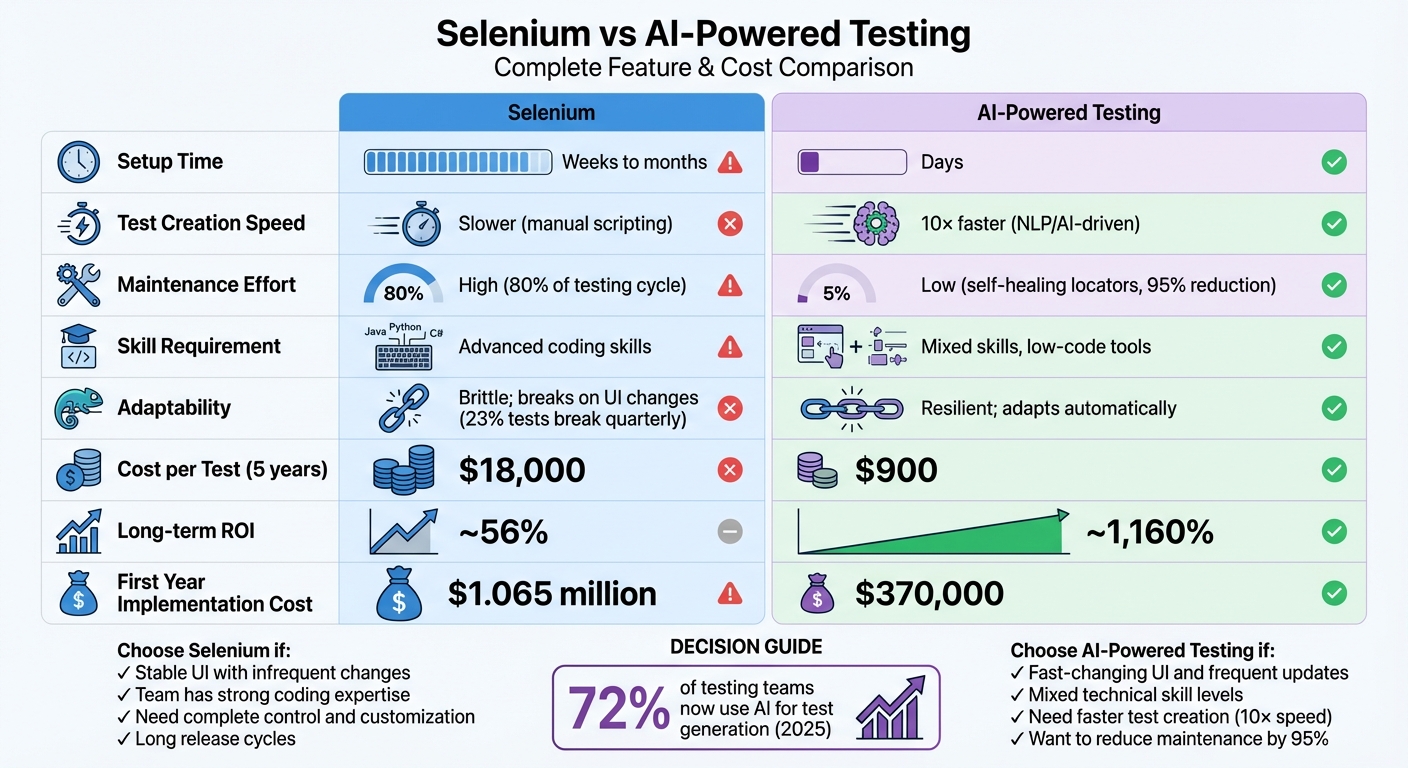
| Criterion | Selenium | AI-Powered Testing |
|---|---|---|
| Setup Time | Weeks to months | Days |
| Test Creation Speed | Slower (manual scripting) | 10× faster (NLP/AI-driven) |
| Maintenance Effort | High | Low (self-healing locators) |
| Skill Requirement | Advanced coding skills | Mixed skills, low-code tools |
| Cost per Test | $18,000 (5 years) | $900 (5 years) |
| Long-term ROI | ~56% | ~1,160% |
Takeaway:
If your team struggles with brittle tests or lacks coding expertise, AI-powered testing can save time and effort. However, Selenium remains a solid choice for those who need complete control and have the technical resources to manage it. A hybrid approach - leveraging both tools - may be the most effective strategy for many teams.
Selenium vs AI-Powered Testing: Complete Feature and Cost Comparison
AI-Powered Selenium Testing Explained: The Future of Automation
What Is Selenium and How Does It Work?
Selenium is an open-source framework designed to automate web browsers by mimicking user actions like clicking, filling out forms, and navigating pages. Since June 2018, Selenium WebDriver has been recognized as a W3C standard, which ensures consistent performance across browsers without needing browser-specific adjustments.
This framework is completely free and supports a wide range of programming languages, including Java, Python, C#, Ruby, JavaScript, and Kotlin.
Selenium Architecture and Core Components
Selenium is more than just a single tool - it’s a collection of tools designed to meet various testing needs. At its core, the WebDriver API communicates directly with browser-specific drivers (like ChromeDriver for Chrome or GeckoDriver for Firefox). This setup allows it to control the browser without embedding itself into your application code.
For quick prototyping or reproducing bugs, Selenium IDE - a browser extension for Chrome and Firefox - offers an easy way to record and replay user interactions. For scaling tests, Selenium Grid comes into play. It enables you to run tests across multiple machines, operating systems, and browser versions simultaneously, which is particularly useful for cross-browser compatibility testing.
A typical workflow might involve recording a basic test in Selenium IDE, refining it into a WebDriver script using your preferred programming language, and then running that script across various browser and operating system combinations.
These components form the backbone of Selenium’s ability to support diverse browsers while remaining cost-effective.
Where Selenium Performs Well
Selenium stands out for its support of cross-browser compatibility. It works seamlessly with all major browsers - Chrome, Firefox, Safari, and Edge - and even supports older versions that many modern tools neglect. Its open-source nature means you don’t have to worry about licensing costs; the only expenses involve infrastructure, whether you’re using local hardware or cloud-based grids.
Another strength is its multi-language support, which allows teams with different programming backgrounds to collaborate on the same test suite without needing to learn a new language. Additionally, Selenium benefits from a strong community that contributes to its stability and long-term development.
Common Problems with Selenium
One of Selenium’s biggest challenges is its sensitivity to changes in the DOM. Since locators like XPath or CSS selectors are tied to the DOM structure, even small UI updates can cause tests to fail. This often forces teams to spend significant time fixing broken tests instead of creating new ones.
Selenium also has a steep learning curve. It requires strong programming skills and an in-depth understanding of web technologies, which can make onboarding new team members a time-consuming process. Moreover, Selenium is strictly focused on browser automation. It doesn’t natively support desktop applications or mobile testing (which requires tools like Appium), nor does it include built-in reporting or debugging features.
"Browser automation has the reputation of being 'flaky', but in reality, that is because users frequently demand too much of it." - Selenium Documentation
These limitations have prompted some teams to explore AI-driven tools that offer features like self-healing locators, which reduce the maintenance burden and make testing workflows more efficient.
What Is AI-Powered Testing?
AI-powered testing leverages machine learning and intelligent automation to simplify the process of creating, running, and maintaining tests, minimizing the need for manual effort. Instead of writing complex scripts in programming languages, teams can describe their testing needs in plain language or use visual tools that adapt automatically when the application changes.
The key difference between AI-powered testing and traditional tools like Selenium lies in how they handle changes. Traditional frameworks often break when a developer renames a button or reorganizes a page because they depend on static locators. AI testing platforms, on the other hand, use self-healing technology. This approach analyzes multiple attributes - like text, position, nearby elements, and even visual appearance - to identify the right element, even after a UI update. By automating updates, AI testing eliminates the maintenance headaches that are common with Selenium, redefining how tests adapt to change.
How AI Testing Works
AI-powered testing platforms rely on three main technologies:
Self-healing capabilities: These automatically update locators when UI changes occur. For example, if a button's CSS class changes from "submit-btn" to "primary-action", the AI evaluates the element's text, position, and visual traits to adjust the locator automatically. This removes the constant need for manual updates, a common issue in Selenium-based testing.
Natural language processing (NLP): NLP allows users to write tests in everyday language instead of code. For instance, instead of coding driver.find_element(By.XPATH, '//button[@id="checkout"]').click(), you can simply write "click the checkout button" or "add the most expensive item to the cart". The AI interprets the intent and performs the necessary technical actions.
Visual intelligence: This ensures that tests validate what users actually see on the screen, not just the underlying code. Selenium might confirm that a button exists in the code, but it could miss issues like a button being hidden by another element or displayed in hard-to-read colors. Visual AI analyzes the rendered page, identifying these user-facing problems.
In October 2025, Peloton reported a 78% reduction in test maintenance time after adopting Applitools Visual AI to tackle UI flakiness and speed up reviews.
These technologies form the foundation of modern AI testing platforms, which come equipped with features that make test creation and maintenance much easier.
Main Features of AI Testing Platforms
AI testing platforms offer several standout features that set them apart from traditional tools:
- Self-healing locators: These use machine learning to keep tests stable across UI changes. When an element's identifier changes, the platform analyzes contextual clues - like surrounding text, position, and DOM structure - to locate the element and update the test automatically. This can cut maintenance time by up to 70%.
- Low-code and no-code options: These make test creation accessible to non-technical team members. Product managers, designers, and manual testers can contribute using visual recorders or natural language commands, eliminating the need to learn programming.
- Automated analytics and triage: Machine learning can categorize test failures, flag flaky tests, and prioritize high-risk areas. This can reduce the time spent on bug triage by up to 95%. By 2025, 72% of testing teams were using AI for test case and script generation.
- Cross-platform support: Unlike Selenium, which focuses on web browsers, AI testing platforms extend their capabilities to mobile apps and APIs, providing a more unified solution.
Benefits and Tradeoffs of AI Testing
AI testing offers considerable efficiency improvements. Teams transitioning to AI-powered platforms report a 95% drop in maintenance efforts and a 10× increase in test creation speed. For example, a suite of 500 tests requiring 47 hours of weekly maintenance with Selenium can shrink to just 2.3 hours with an AI-driven platform. The cost per test case also drops - from around $347 with Selenium to $52 with AI-based testing. Teams using generative AI for end-to-end testing have even seen software release cycles speed up by as much as 5×.
However, these benefits come with some drawbacks:
- Vendor lock-in: Tests built on proprietary AI platforms often cannot be exported to open-source frameworks. This forces organizations to depend on the vendor's long-term reliability and pricing.
- Higher costs: While Selenium is free, AI platforms often have more complex and expensive pricing models, which can add up for larger teams.
- Black box decision-making: AI's automated decisions, such as self-healing locators, lack transparency. Engineers accustomed to fully understanding their tests may find this lack of clarity frustrating.
"Selenium promised to automate testing. Instead, it automated suffering." – Rishabh Kumar, Virtuoso QA
This quote underscores the challenges faced by teams relying on traditional tools, while also highlighting the trust required to embrace AI-powered testing.
Selenium vs AI-Powered Testing: Direct Comparison
Comparison Criteria
To make an informed decision between Selenium and AI-powered testing, QA teams need to consider several practical factors: setup time (how quickly testing can begin), test creation speed (the pace at which new tests can be developed), maintenance requirements (effort needed to keep tests running smoothly), scalability (how well the solution grows with increasing test demands), skill requirements (the level of technical expertise required), and cost analysis (total long-term investment beyond licensing fees).
As mentioned earlier, Selenium often struggles with high maintenance demands. On the other hand, AI-powered platforms significantly reduce this burden by using self-healing locators, cutting maintenance effort by up to 95%. The table below breaks down these criteria to illustrate the differences.
Feature-by-Feature Comparison Table
| Criterion | Selenium (Traditional) | AI-Powered Testing |
|---|---|---|
| Setup Time | Weeks to months (infrastructure + coding) | Days (cloud-native/low-code) |
| Test Creation Speed | Manual scripting; slower test development | NLP/generative AI (10× faster) |
| Maintenance Effort | High (80% of testing cycle) | Low (self-healing locators) |
| Skill Requirement | Expert SDET (Java, Python, C#) | Mixed skills (manual testers + developers) |
| Adaptability | Brittle; breaks on UI changes | Resilient; adapts to DOM/UI shifts |
| Execution Environment | Local or grid-based | Cloud-native parallel execution |
| Cost per Test (5-year) | $18,000 (with maintenance) | $900 (with maintenance) |
| Long-term ROI | Around 56% | Around 1,160% |
This comparison underscores the clear advantages of AI-powered testing platforms, particularly in terms of speed and cost efficiency.
Selenium, while free to download, comes with hidden costs. Its high maintenance demands and need for specialized engineering talent result in significant long-term expenses. For instance, a mid-market company could spend an average of $1.065 million in the first year implementing Selenium, compared to $370,000 for AI-powered platforms. A major cost driver is the "maintenance tax" - Selenium tests tend to become flaky, with about 23% of tests breaking each quarter, requiring 156 hours of debugging per month.
"The real ROI of AI-native testing isn't just cost savings. It's competitive velocity." – Virtuoso QA
AI-powered testing platforms also deliver a 10× speed advantage in test creation over traditional frameworks. This speed boost allows teams to release features up to 85% faster than those relying on Selenium setups.
sbb-itb-eb865bc
How to Choose Between Selenium and AI Testing
Deciding between Selenium and AI testing depends on your project's needs and goals. Let’s break down when each approach works best and how combining them might offer the most value.
When Selenium Is the Right Fit
Selenium works best for projects with stable user interfaces and longer release cycles. It’s a solid choice for teams with skilled SDETs (Software Development Engineers in Test) who are comfortable coding in languages like Java, Python, C#, or JavaScript. This open-source tool is particularly effective when you’re building custom frameworks and working in areas that don’t require frequent updates. While the initial setup can be time-intensive, it pays off in scenarios where maintenance demands stay low.
When AI-Powered Testing Shines
AI-powered testing is a game-changer for fast-moving projects with frequently changing UIs. Features like self-healing and visual testing significantly cut down on maintenance efforts. Plus, no-code or low-code tools make it easier for non-technical team members to participate in test creation. For instance, self-healing can reduce build failures by up to 40%. A real-world example? In October 2025, Peloton slashed its test maintenance time by an impressive 78% after adopting Applitools Visual AI.
"Some of the best testers I've known in my career are the worst scripters... Wouldn't it be amazing if I could have my best testers be able to do automation?"
– Don Jackson, Agentic AI Expert, Perfecto
Blending Selenium and AI Testing
Sometimes, the best approach is to use both tools together. Keep your existing Selenium tests for stable, low-maintenance areas, and introduce AI-powered testing where frequent changes make maintenance a headache. For example, start by using AI tools to fix broken locators or handle visual regression testing. Gradually, you can integrate AI-driven tests into your CI/CD pipeline alongside your Selenium tests. This hybrid approach allows for a smoother transition, maintains human oversight for critical tasks, and balances efficiency with reliability. It’s a practical way to reduce maintenance while boosting overall testing effectiveness.
How Rock Smith Improves AI-Powered Testing
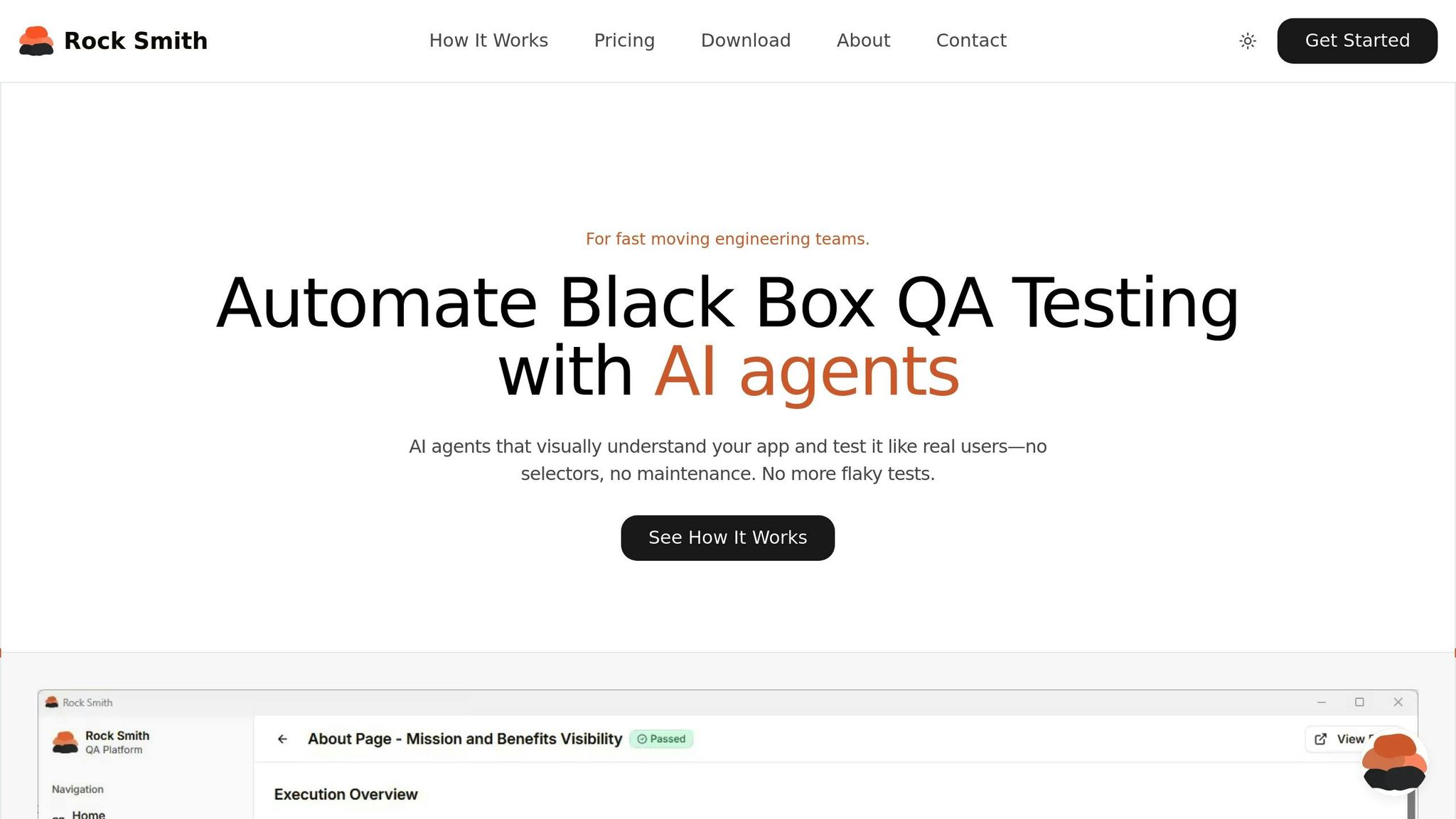
Rock Smith takes a fresh approach to testing by eliminating the hassle of maintaining fragile selectors. Instead, it focuses on defining test intent in plain English, making the process more intuitive and less time-intensive.
Rock Smith's Main Features
Rock Smith uses semantic element targeting, which means it identifies elements like buttons, forms, and modals based on their visual appearance and context - much like how a human would. This makes tests more reliable, even if developers tweak CSS classes or restructure the DOM.
The platform runs tests locally, ensuring sensitive data stays on your machine. This is especially important for U.S.-based teams working with internal applications, localhost environments, or staging servers that require secure, local execution.
Rock Smith also generates 14 different test types automatically, covering scenarios like boundary values, invalid inputs, XSS attacks, and SQL injection. Teams can even set up test personas to simulate specific user behaviors, such as rapid navigation or cautious exploration.
With real-time monitoring, every test provides detailed screenshots and AI-driven insights, making debugging simpler and faster when issues arise.
These features combine to create a powerful, efficient testing tool.
Rock Smith vs Selenium: Workflow Comparison
Rock Smith's user-friendly design and advanced capabilities simplify testing workflows compared to Selenium. Here's how the two stack up:
| Feature | Selenium | Rock Smith |
|---|---|---|
| Element Identification | Relies on brittle selectors (XPath, CSS, ID) | Uses semantic targeting (Visual description) |
| Maintenance | High; scripts often break with UI changes | Low; AI adapts to UI updates automatically |
| Skill Requirement | Requires coding knowledge (Java, Python, C#, etc.) | Plain English instructions - no coding needed |
| Security | Data processed in the cloud | Local execution keeps data secure |
| Test Logic | Hard-coded instructions | AI-driven visual reasoning |
| Edge Testing | Manual script creation | Automated generation of 14 test types |
"AI agents that visually understand your app and test it like real users - no selectors, no maintenance. No more flaky tests." - Rock Smith
Rock Smith Pricing and Cost Analysis
Rock Smith not only enhances operations but also delivers substantial cost savings.
The platform offers pay-as-you-go pricing at $0.10 per credit, with a minimum purchase of 50 credits for $5.00. For teams with recurring testing needs, subscription plans are available. The Growth plan provides 550 credits monthly, with additional credits billed at $0.09 each, while the Professional plan includes 2,000 credits monthly, with overage credits billed at $0.06 each.
Over five years, Selenium testing can cost around $18,000, but Rock Smith reduces this to approximately $900, cutting maintenance costs by as much as 95%. Organizations adopting AI-powered testing platforms report a 99% reduction in cost per test execution.
Conclusion
Selenium and AI-powered testing cater to different needs, and the best choice hinges on your team’s expertise, budget, and the complexity of your project. Selenium offers complete control and no licensing fees, making it ideal for teams with strong programming skills and stable applications. However, it requires ongoing maintenance whenever there are UI changes.
On the other hand, AI-powered testing eases the maintenance workload significantly, thanks to features like self-healing locators and natural language interfaces. These tools can reduce maintenance efforts by up to 90% and have already been adopted by over 70% of QA teams. That said, they come with higher upfront costs and some reliance on vendors.
A hybrid approach may offer the best of both worlds. By combining Selenium for core logic with AI tools for tasks like visual validation and self-healing, teams can balance control with efficiency. This strategy aligns with the industry trends discussed earlier.
"AI is just an assisting tool...human effort is required to validate its accuracy"
To choose the right path, focus on your team’s biggest challenges. If brittle selectors and frequent updates are slowing you down, AI-powered testing might provide a quicker return on investment. For teams with skilled engineers who need maximum flexibility, Selenium remains a dependable option. Testing both approaches side by side can help you assess their reliability before making a full commitment.
With 81% of development teams expected to integrate AI into their workflows by late 2025, it’s worth evaluating your unique requirements. Experiment on a small scale with both methods to determine what works best for your team.
FAQs
What are the key benefits of AI-powered testing compared to Selenium?
AI-powered testing brings a fresh approach to automation, offering benefits that go beyond what traditional Selenium methods can achieve. By using machine learning, these tools make testing quicker, more dependable, and simpler to manage, especially when applications evolve. For instance, AI tools can automatically fix broken selectors, eliminating the hassle of constant manual updates.
On top of that, AI solutions can dive into test execution data to refine test coverage and prioritize test runs, enabling faster feedback cycles and reducing flaky test failures. They can even propose or create missing test cases, delivering smarter, wider coverage without requiring heavy manual scripting. This means QA teams can save valuable time, enhance precision, and shift their focus to more strategic tasks.
What are the benefits of combining Selenium with AI-powered testing for QA teams?
Combining Selenium with AI-driven testing tools offers QA teams a powerful way to enhance their workflows. Selenium provides a solid foundation with its open-source flexibility, support for various programming languages, and reliable cross-browser testing features. When paired with AI-powered tools, this setup takes efficiency to the next level by automating repetitive tasks like script generation, minimizing the need for manual coding, and streamlining processes.
AI can also tackle some of the common pain points associated with Selenium. For example, features like self-healing locators and visual validation can automatically detect and fix broken selectors when UI changes occur, cutting down on maintenance efforts. AI tools can also pinpoint flaky tests, recommend missing test cases, and optimize the test execution sequence, ensuring faster feedback and more thorough testing coverage.
By integrating these two approaches, QA teams can retain Selenium’s stability while unlocking greater efficiency and scalability - an ideal solution for managing the demands of complex, fast-changing applications.
How can QA teams decide between using Selenium and AI-powered testing solutions?
When deciding between Selenium and AI-powered testing tools, the right choice hinges on your team's expertise, project needs, and overall goals. Selenium is a solid option for teams with strong coding skills, as it relies on manual script creation and upkeep. This makes it a better fit for smaller projects or teams with technical experience.
On the other hand, AI-powered testing tools streamline the process by simplifying test creation and cutting down on maintenance through self-healing features. These tools are particularly useful for adapting to changes in user interfaces and come equipped with advanced capabilities like pattern recognition and autonomous analysis. This makes them a reliable choice for large-scale or complex testing scenarios, offering improved efficiency and scalability.
While AI tools might come with higher initial costs, they often pay off in the long run by reducing maintenance efforts and speeding up testing cycles. To make the right choice, weigh factors like your team's skill level, budget, and the complexity of your testing needs.